Python Wiki
编程规范
代码缩进:用实际例子说明 Python 中缩进的重要性,以及如何正确使用 4 个空格进行缩进。
命名规范:通过示例演示变量、函数、类等命名时应遵循的规范,例如使用小写字母和下划线命名变量 (myvariable)。
代码注释:演示如何使用单行注释 (# 注释) 和多行注释 ("""多行注释""") 来解释代码的作用。
# 好的代码示例:
def calculate_sum(a, b):
    """计算两个数的和。

    Args:
        a: 第一个数。
        b: 第二个数。

    Returns:
        两个数的和。
    """
    return a + b

# 不推荐的代码示例:

def  calculateSum ( a,B ):
    # 计算 a 和 B 的和
    return a+B
模块导入
导入整个模块:使用 import 关键字导入整个模块,并使用模块名调用函数。
导入特定函数:使用 from … import … 语法从模块中导入特定函数,并直接使用函数名调用。
使用别名:使用 as 关键字为模块或函数指定别名。
# 导入整个 os 模块
import os

# 使用 os 模块的 getcwd 函数
current_directory = os.getcwd()
print(current_directory)

# 从 os 模块导入 getcwd 函数
from os import getcwd

# 直接使用 getcwd 函数
current_directory = getcwd()
print(current_directory)

# 为 os 模块指定别名
import os as my_os

# 使用别名调用 getcwd 函数
current_directory = my_os.getcwd()
print(current_directory)
输入输出
使用 input() 函数获取用户输入。
使用 print() 函数输出内容到控制台。
使用 f-string 格式化字符串,使输出更具可读性。
# 获取用户输入的姓名
name = input("请输入您的姓名:")

# 使用 f-string 格式化输出问候语
print(f"您好,{name}!")
基础数据类型操作
数值类型:演示整数、浮点数的基本运算,以及类型转换。
字符串类型:演示字符串拼接、格式化、查找、替换等操作。
布尔类型:演示布尔运算 (and, or, not) 和比较运算符 (==, !=, >, <, >=, <=)。
# 数值类型操作
a = 10
b = 3.14
c = a + b  # 加法
d = a - b  # 减法
e = a * b  # 乘法
f = a / b  # 除法
g = a // b  # 整除
h = a % b  # 取余
i = int(b)  # 类型转换,将浮点数转换为整数

# 字符串类型操作
name = "Alice"
greeting = "Hello, " + name + "!"  # 字符串拼接
message = f"欢迎 {name}!"  # f-string 格式化字符串

# 布尔类型操作
is_true = True
is_false = False
result1 = is_true and is_false  # 逻辑与
result2 = is_true or is_false   # 逻辑或
result3 = not is_true          # 逻辑非
错误和异常
常见的错误类型:介绍 SyntaxError, NameError, TypeError 等常见错误类型,并展示相应的代码示例。
使用 try-except 语句处理异常,避免程序崩溃。
# 常见的错误类型示例

# SyntaxError:语法错误
print("Hello, world!  # 缺少右括号

# NameError:未定义的变量

print(undefined_variable)

# TypeError:类型错误
print("Hello" + 123)

# 使用 try-except 语句处理异常

try:
    result = 10 / 0  # 可能引发 ZeroDivisionError
except ZeroDivisionError:
    print("除数不能为零!")
通过在基础知识部分添加这些内容,可以让您的知识库更加完整,为初学者提供更全面的学习指导。
代码一定要简洁!重复的逻辑可以用函数封装来实现,R 也是一样。
数据类型
基本数据类型
整数、浮点数、布尔. 可以通过 dir() 查看对象的可用的属性,help 可以看到方法。
dir(int)前面的 __and__ 是可用方法,后面的 bit_length
是可用属性。字符、元组、列表、字典也可以用类似方式查看。
基础知识
Python 版本
import sys
sys.version_info
sys.version
# => '3.7.1 (default, Dec 14 2018, 13:28:58)
#    [Clang 4.0.1 (tags/RELEASE_401/final)]
一般在shell里,输入 python 即可直接看到python 的版本。
虚拟环境
用conda来生成python的虚拟环境特别的方便。
conda create -name myvenv python = 3.8查看安装的包
pip list安装包
pip install -i https://pypi.tuna.tsinghua.edu.cn/simple seabornUbuntu
在 Ubuntu 中, https://zhuanlan.zhihu.com/p/81321705。
;;使用--envs选项(-e)查看所有已创建的虚拟环境,在列出的虚拟环境中,使用星号(*)标识的是当前激活的虚拟环境.
conda info --envs
用之前打开m-x venv-workon.
工作目录
类似于 R 的 getwd(),setwd().
# 引入模块,获得工作目录
import os
from pathlib import Path

os.getcwd()  # 获得当前工作目录
# => '/path/to/example'

os.chdir('/path/to/work')  # 改变工作目录
os.mkdir('work')           # 建立新目录
os.rmdir('work')           # 删除目录
os.rename('fff.txt', 'fool.txt')  # 重命名
os.remove('h.txt')         # 删除文件
os.listdir(".")            # 获得当前工作目录下的所有文件

print(list(filter(os.path.isfile, os.listdir())))  # 列出当前文件夹下所有文件
print(list(filter(os.path.isdir, os.listdir())))   # 列出当前文件夹下所有文件夹
也能获得system命令
import os
os.system("ls")
os.system("ls -l") #more information
os.system("ls -F") #more information
os.system("dir")
os.remove #删除文件
文件通配符
glob 模块提供了一个在目录中使用通配符搜索创建文件列表的函数:
import glob
glob.glob('*.py')
##查看文件编码方式
sys.getfilesystemencoding()
# => 'utf-8'os.path.exists
在 Python 中检查文件是否存在时,最常用的方法是
os.path.exists()。这是一个简单、直接且高效的方法。以下是具体实现和相关函数:
- 使用
os.path.exists():
import os

file_path = "/path/to/your/file.txt"
if os.path.exists(file_path):
    print(f"文件 {file_path} 存在")
else:
print(f"文件 {file_path} 不存在")- 如果你特别想检查它是否是一个文件(而不是目录),可以使用
os.path.isfile():
import os

file_path = "/path/to/your/file.txt"
if os.path.isfile(file_path):
    print(f"{file_path} 是一个文件")
else:
print(f"{file_path} 不是一个文件或不存在")- 如果你想检查它是否是一个目录,可以使用
os.path.isdir():
import os

dir_path = "/path/to/your/directory"
if os.path.isdir(dir_path):
    print(f"{dir_path} 是一个目录")
else:
print(f"{dir_path} 不是一个目录或不存在")- 如果你需要检查文件是否可读,可以使用
os.access():
import os

file_path = "/path/to/your/file.txt"
if os.path.exists(file_path) and os.access(file_path, os.R_OK):
    print(f"文件 {file_path} 存在且可读")
else:
    print(f"文件 {file_path} 不存在或不可读")
这些方法不使用 try 语句,而是直接检查文件或目录的状态。它们通常比使用 try-except 块更直接。
注意:在多线程环境中,检查文件存在性和实际使用文件之间可能存在竞态条件。如果这是一个问题,需要使用适当的锁定机制,或使用 try-except 块处理文件操作。
__code__
这个函数可以用来查看变量参数等信息.
def test(x, y = 10):
    x += 100
    print(x, y)
test
# <function __main__.test(x, y=10)>
test.__code__
# <code object test at 0x11d9b15d0, file "<ipython-input-43-3d74f8241943>", line 1>
test.__code__.co_varnames # 参数及变量量名列列表。
# => ('x', 'y')
test.__code__.co_consts # 指令常量
# => (None, 100)
test.__defaults__ # 参数默认值
# => (10,)
test(1)
# => 101 10
续行符
如果代码太长写成一行不便于阅读 可以使用.
year = int(input('请输入年份: '))
# 如果代码太长写成一行不便于阅读 可以使用\对代码进行折行
is_leap = year % 4 == 0 and year % 100 != 0 or \
          year % 400 == 0
print(is_leap)
数据交换
数据交换不需要用中间变量。
x=2;y=3
x,y=y,x
x
# => 3
y
# => 2
open
读取数据。
with open('imagenet_classes.txt') as f:
    labels = [line.strip() for line in f.readlines()]
assert
利用assert来发现问题.可以 check 等式是否成立. 加上-O 参数可以禁用断言,如 python -O 对于数组越界这类运行时错误,不建议使用断言处理。
a = 3
assert(a>1)
print("断言成功,程序继续向下执行")

b = 4
assert(b>7)
# => Traceback (most recent call last):
#      File "<stdin>", line 1, in <module>
#    AssertionError
print("断言失败,程序报错")

x = 1
y = 2
assert x == y, "not equals"
# => Traceback (most recent call last):
#      File "<stdin>", line 1, in <module>
#    AssertionError: not equals
eval
和 R 一样,eval 的用法也类似。eval(strexpression)作用是将字符串转换成表达式,并且执行。
eval('[1,2,3]')
#> [1, 2, 3]
x = 7
eval('x**2')
# => 49
应该尽量避免使用eval,在需要使用eval 的地方可用更加safe的ast.literaleval 替代.
input
message = input("tell me something, and I will repeat it back to you:")
print(message)
import numpy as np
import pandas as pd
name = input("Please enter your name: ")
print("Hello, " + name + "!")x = eval(input('Enter a number'))
print(x, type(x))age = input("how old are you?")
age
21unique
可以快速了解一个变量的取值。
import seaborn as sns
df = sns.load_dataset("titanic")
df["class"].unique()
# ['Third', 'First', 'Second']
伪随机数
生成一个[1,100]以内的随机整数 random.randint(1,100)。随机生成5个随机小数np.random.randn(5). 0-1 随机小数,random.random(),括号内不传参。
import random
random.seed(1010)
random.randint(1, 100) # 生成一个[1,100]以内的随机整数
# => 78
random.choice([1,2,4,'word']) #随机选择一个数字
# => 2
random.sample(range(100), 5) # 随机生成5个100 以内不重复的数字
# => [68, 10, 52, 55, 21]
random.random() # 0-1 随机小数
# => 0.14252352294885373
random.shuffle([1, 2, 3, 4, 5]) # 随机打乱列表
如果只是想简单洗牌,那么就可以用random.shuffle.
import random
import numpy as np
values = [5, 10, 15, 20, 25]
random.shuffle(values)
print(values)
#[25, 20, 5, 15, 10]
np.random.normal(mu, sigma, n) #从正态分布中抽取数据
s = np.random.permutation(5) #随机生成一个[0 - 5]序列
# => array([3, 0, 1, 4, 2])
s[:3]
# => array([3, 1, 0])
十进制转换
内置多个函数将整数转换为指定进制的字符串,反向操作用 int.十进制转二进制
print(bin(100))
# => 0b1100100
惰性求值
惰性计算。指的是仅仅在真正需要执行的时候才计算表达式的值。惰性计算是指在需要的时候才计算,而不是立即计算。这样可以节省计算资源,提高程序的运行效率。惰性计算的一个典型应用是生成器。生成器是一种特殊的迭代器,它可以在需要的时候才生成数据,而不是一次性生成所有数据。
(1) 避免不必要的计算,带来性能上的提升。对于python 中的条件表达式。
from time import time
t = time()
abbreviations = ['cf.', 'e.g.', 'ex.']
for i in range(10):
    for w in ('Mr.', 'hat', '.'):
        if w in abbreviations:
# if w[-1]=='.' and w in abbreviations:
            pass
上面的代码如果使用注释行代替第一个if, 运行的时间大约会节省 10%。因此在编程过程中,尽量使用确定性的条件。
(2) 节省空间,使得无限循的数据结构成为可能。python 中最典型的使用延迟计算的例子就是生成器表达式了。它仅在每次需要计算的时候才通过 yield 产生所需要的元素。
def fib():
    a, b=0, 1
    while True:
        yield a
        a, b=b, a + b

from itertools import islice
list(islice(fib(), 5))
# => [0, 1, 1, 2, 3]
StackOverflow 上有许多热门的 Python 问题。其中一个备受关注的问题是“yield 关键词的作用是什么?”。
简单理解,yield 是 Python 中的一个特殊关键词。它可以让函数变成一个“会停顿的函数”:每次遇到 yield,函数都会暂停并返回一个值;下次再调用时,会从上次暂停的地方继续执行。
举个简单的例子:
使用 yield 创建一个简单的计数器:
def countdown(n):
    while n > 0:
        yield n
        n -= 1

for i in countdown(5):
    print(i)
# 输出: 5, 4, 3, 2, 1
你提出的想法很好,让我们来分析一下:
def countdown(n):
    while n > 0:
        n -= 1
        return n

for i in countdown(5):
    print(i)
这个版本确实不行,原因如下:
函数提前返回:虽然函数有 return 语句,但它在第一次循环就返回了,导致函数只执行一次就结束。举一个简单的例子:
def countdown(n):
    while n > 0:
        n -= 1
        return n

print(countdown(5))
# 输出: 4
你会发现,函数只返回了一个值,而不是期望的倒数序列。
无法迭代:因为函数只返回一个值,它不是一个可迭代对象,所以不能在for循环中使用。
输出不完整:即使函数能运行,它也只会输出一个值,而不是期望的倒数序列。
无法迭代:因为函数没有yield或return语句,它不是一个可迭代对象,所以不能在for循环中使用。
没有输出:即使函数能运行,它也不会产生任何可打印的值。
使用yield的版本之所以有效,是因为:
- yield使函数成为一个生成器,可以被迭代。
- 每次yield都会暂停函数并返回当前的n值。
- 下次迭代时,函数会从上次暂停的地方继续执行。
所以,你的想法虽然简化了函数,但失去了yield带来的关键功能。yield在这里的作用是创建一个可以逐步生成值的迭代器,这是普通函数无法直接实现的。
这个例子中,countdown函数会一个接一个地"吐出"数字,而不是一次性返回所有数字。每次yield,函数就暂停一下,等待下一次被调用。
使用yield的好处是:
- 节省内存:不需要一次性生成所有数据。
- 按需生成:只在需要时才生成下一个值。
这对于处理大量数据或者需要逐步生成数据的场景特别有用。
简单来说,yield就像是一个会自动记住位置的暂停按钮,让你的函数可以一步一步地产生结果,而不是一次性完成所有工作。
节省内存
运行一些操作可能会导致为新结果分配内存。例如,如果我们用Y=×+Y,我们将取消引用Y指向的张量, 而是指向新分配的内存处的张量。
在下面的例子中,我们用Python的id()函数演示了这一点,它给我们提供了内存中引用对象的确切地址。运行Y =Y+x后,我们会发现id(Y)指向另一个位置。这是因为Python首先计算Y+X,为结果分配新的内存, 然后使Y指向内存中的这个新位置。
before=id(Y)
Y=Y+X
id(Y)==before
# False
这可能是不可取的,原因有两个:
- 首先,我们不想总是不必要地分配内存。在机器学习中,我们可能有数百兆的参数,并且在一秒内多次更新所有参数。通常情况下,我们希望原地执行这些更新;
- 如果我们不原地更新,其他引用仍然会指向旧的内存位置,这样某些代码可能会无意中引用旧的参数。
幸运的是,执行原地操作非常简单。我们可以使用切片表示法将操作的结果分配给先前分配的数组,例如 Y[:] = <expression>。为了说明这一点,我们首先创建一个新的矩阵 Z,其形状与另一个 Y 相同,并使用
zeros_like 分配一个全 0 的块。
Z = torch.zeros_like(Y)
print('id(Z):',id(Z))
Z[:] = X +Y
print('id(Z):', id(Z))
# id(Z): 140327634811696 id(Z): 140327634811696
也可以使用 X+=Y 来实现 X=X+Y 的原地操作,同时还能减少内存开销。
广播机制
在上面的部分中,我们看到了如何在相同形状的两个张量上执行按元素操作。在某些情况下,即使形状不同, 我们仍然可以通过调用广播机制 (broadcasting mechanism) 来执行按元素操作。这种机制的工作方式如下:
- 通过适当复制元素来扩展一个或两个数组,以便在转换之后,两个张量具有相同的形状;
- 对生成的数组执行按元素操作。
在大多数情况下,我们将沿着数组中长度为1的轴进行广播,如下例子:
a = torch.arange (3) . reshape((3, 1))
b= torch. arange(2) . reshape((1, 2))
a+b
# =>
# tensor([[0, 1],
#         [1, 2],
#         [2, 3]])
from..imports
如果你希望直接将 argv 变量导入你的程序(为了避免每次都要输入sys.),那么你可以通过使用 from sys import argv 语句来实现这一点。警告:一般来说,你应该尽量避免使用from…import 语句,而去使用import 语句。
这是为了避免在你的程序中出现名称冲突,同时也为了使程序更加易读。
案例:
from math import sqrt
print ("Square root of 16 is", sqrt (16))
__name__
在 Python 中,_name__
是一个内置的特殊变量,它的值取决于模块是如何被运行的。
- 如果模块是被直接运行的(比如你在命令行输入
python myscript.py),那么_name__的值就是"__main__"。 - 如果模块是被导入的(比如在另一个 Python 文件中你写了
import myscript),那么_name__的值就是模块的名字(在这个例子中就是myscript)。
你可以利用这个特性来决定你的代码的行为。下面是一个例子:
# my_script.py
if __name__ == "__main__":
    print("This script is being run directly, not imported.")
else:
print("This script is being imported, not run directly.")- 如果你直接运行这个脚本(
python myscript.py),它会打印 "This script is being run directly, not imported."。 - 如果你在另一个脚本中导入这个脚本(
import
myscript
),它会打印 "This script is being imported, not run directly."。
这种模式可以让你的代码同时作为脚本(直接运行)和模块(被其他脚本导入)使用,而且行为可以有所不同。这在编写 Python 代码时非常有用。
缺失值
isnull
Python 中 np.nan 与 None 是等价关系?
import pandas as pd
import numpy as np
df1 = pd.Series([1, np.nan, 2, None])
# => 0    1.0
#    1    NaN
#    2    2.0
#    3    NaN
#    dtype: float64
df1.isnull()
# => 0    False
#    1     True
#    2    False
#    3     True
#    dtype: bool
df1[df1.notnull()]
# => 0    1.0
#    2    2.0
#    dtype: float64
Series 中的 isnull() 和 notnull() 同样适用于 DataFrame。
fillna
df.fillna(),将缺失值填充为给定值.
df1
# => 0    1.0
#    1    NaN
#    2    2.0
#    3    NaN
#    dtype: float64
df1.fillna(0)
# => 0    1.0
#    1    0.0
#    2    2.0
#    3    0.0
#    dtype: float64
缺失值填充
删除缺失值,删除一个特征,将缺失值填充为一个固定值。
housing.dropna(subset=['total_bedrooms']) #option 1 可以理解为删除缺失值
housing.drop('total_bedrooms', axis=1)  #删除一个特征
median = housing['total_bedrooms'].median()
housing['total_bedrooms'].fillna(median)
布尔值
a = "Hi"
b = "Hi"
a == b
# => True
a is b
# => True

a1 = "I am using long string for testing"
a2 = "I am using long string for testing"
# => 'I am using long string for testing'
a1 == a2
# => True
a1 is a2
# => False| 操作符 | 意义 |
| is | object identity |
| == | equal |
is 的作用是用来检查对象的标示符是否一致, 也就是比较两个对象在内存中是 否拥有同一个内存空间.
%
求模运算%, 这点和 R 一样。
4 % 3
# 1
^
Python 中的逻辑运算符,异或xor。
一种逻辑运算符是并不排它用 or 表示;另外一种就是异或,在Python 中用 ^ 表示。
| A | B | AB |
| True | True | False |
| True | False | True |
| False | True | True |
| False | False | False |
也就是说, AB 有一个为真,但不同时为真 的运算称作异或。
0^0
# => 0
0^1
# => 1
1^0
# => 1
1^1
# => 0
5^3
# => 6
结果告诉我们数字相同异或值为0,数字不相同异或值为1。
异或是基于二进制基础上按位异或的结果 5 ^ 3 的过程 其实是将5和3分别转换为二进制:
5 = 0101(b)
3 = 0011(b)
按位异或:
按位异或:
00 ->0
10 ->1
01 ->1
11 ->0
排起来就是0110(b) 转换为十进制:6
while
for 循环用于针对集合中的每个元素的一个代码块,而 while 循环不断地运行,直到指定的条件不满足为此。
current_num = 1
while current_num <= 5:
    print(current_num)
    current_num +=1

current_num
# => 6
字符串
在 Python 中 re 模块可以完成对文本的正则化处理。匹配对象的两种方法:group() 和 groups().
re.match
在正则表达式中,通常会选用 | 符号匹配多个字符串。
import re
bt = 'bat|bet|bit'
m = re.match(bt, "bat")
m.group()
titles = '你好,hello, 世界'
pattern = re.compile(r'[\u4e00-\u9fa5]+')
results = pattern.findall(titles)
# => ['你好', '世界']

s = "小明年龄18岁 分数100"
res = re.search(r"\d+", s).group()
res = re.findall(r"\d+", s)
res = re.match("小明", s).group()

##不加group 匹配不到
res = re.match(r"\d+", s)

##分数不是字符串开头,匹配不到
res = re.match("分数", s).group()
这里会涉及到贪婪匹配和非贪婪匹配。
s = "<a>哈哈</a><a>呵呵</a>"
import re
res1 = re.findall("<a>(.*)</a>", s)
# => ['哈哈</a><a>呵呵']
res2 = re.findall("<a>(.*?)</a>", s)
# => ['哈哈', '呵呵']
匹配任何单个字符
.可以匹配任何字符
python 和 r 不同,在正则表达式中,模式在前,字符串在后面。
import re
anyend = '.end'
m = re.match(anyend, 'bend')
m.group()
# => 'bend'
删除字符
Remove All Characters Except Alphabets From a String
s="Hello$@ Python3$"
import re
s1=re.sub("[^A-Za-z]","",s)
print (s1)
#Output:HelloPython
Remove All Characters Except the Alphabets and the Numbers From a String
s = "A man, a plan, a canal: Panama"
import re
s = re.sub(r'[^A-Za-z0-9]', "", s)
Remove All Numbers From a String Using a Regular Expression
s="Hello347 Python3$"
import re
s1=re.sub("[0-9]","",s)
print (s1)
#Output:Hello Python$
Remove All Characters From the String Except Numbers
s="1-2$3%4 5a"
s1="".join(c for c in s if  c.isdecimal())
print (s1)
#Output:12345
重复次数
l = [1, 2, 3]
l * 2
# => [1, 2, 3, 1, 2, 3]
2 * 'abc'
# 'abcabc'
使用多个界定符分割字符串
line ='asdf fjjdk; afed, fjek'
import re
fields = re.split(r'[;,\s]\s*', line)
# => ['asdf', 'fjjdk', 'afed', 'fjek']
values = fields[::2]
delimiters = fields[1::2] + ['']
去除空格
去除字符两端的空格。
a = " heheheh "
a.strip()
# => 'heheheh'
字符串开头或结尾匹配
检查字符串开头或结尾的一个简单方法是使用 str.startswith() 或者是 str.endswith() 方法。比如:
filename = 'spam.txt'
filename.endswith('.txt')
# => True
filename.startswith('file:')
# => False
url = 'http://www.python.org'
url.startswith('http')
# => True
如果想检查多种匹配可能,只需要将所有的匹配项放入到一个元组中去,然后传给 startswith() 或者 endswith() 方法:
import os
filenames = os.listdir(".")
filenames[0:2]
[name for name in filenames if name.endswith(('.org'))] #展示以 org 结尾的文件名称
any(name.endswith('.py') for name in filenames) #判断目录下是否有py 文件
用 shell 通配符匹配字符串
from fnmatch import fnmatch,  fnmatchcase
fnmatch('foo.txt', '*.txt')
fnmatch('foo.txt', '?oo.txt')
fnmatch('Dat45.csv', 'Dat[0-9]*')
字符串搜索和替换
text = 'yeah, but no'
text.replace('yeah', 'yep')
# => 'yep, but no'
对于复杂的模式,需要使用 re 模块中的 sub() 函数。
##LabelBinarizer 类可以一次性完成两个转换
from sklearn.preprocessing import LabelBinarizer
encoder = LabelBinarizer()
housing_cat_1hot = encoder.fit_transform(housing_cat)
housing_cat_1hot
按多个分隔符切分字符串
you need to split a string into fields, but the delimiters aren't consistent throughout the strings.
r,表示需要原始字符串,不转义特殊字符。
import re
line ='asdf fjdk;afed, fjek, asdf'
re.split(r'[;,\s]\s*', line)
# => ['asdf', 'fjdk', 'afed', 'fjek', 'asdf']
字符首尾匹配
字符匹配。
filename ='spam.txt'
filename.endswith('.txt') #判定结尾是否以确定的字符结尾
# => True
filename.startswith('file:')
# => False
url ='http://www.python.org'
url.startswith('http:')
# => True
import os
filenames =os.listdir('.')
filenames
[name for name in filenames if name.endswith('.org')]
any(name.endswith('.py') for name in filenames)
# => False
filename ='spam.txt'
filename[-4:] =='.txt'
# => True
url ='http://www.python.org'
url[:5] =='http:' or url[:6] =='https:' or url[:4] == 'ftp:'
# => Trueimport re
url ='http://www.python.org'
re.match('http:|https:|ftp:', url)使用 Shell 通配符匹配字符串
from fnmatch import fnmatch,fnmatchcase
fnmatch('foo.txt', '*.txt')
# => True
fnmatch('foo.txt', '?oo.txt')
# => True
fnmatch('Dat45.csv', 'Dat[0-9]*')
# => True
names =['Dat1.csv', 'Dat2.csv', 'config.ini']
[name for name in names if fnmatch(name, 'Dat*.csv')]
# => ['Dat1.csv', 'Dat2.csv']
use fnmatchcase() instead, it matches exactly based on the lower- and uppercase conventions that you supply.
fnmatchcase('foo.txt', '*.TXT')
# => False
文本模式匹配与搜索
text = 'yeah, but no, but yeah, but no, but yeah'
text == 'yeah'
# => False
#match at start or end
text.startswith('yeah')
# => True
text.endswith('not')
# => False
text.find('no')
# => 10

text1 = '11/27/2012'
text2 = 'Nov 27, 2012'
import re
if re.match(r'\d+/\d+/\d+', text1):
    print('yes')
else:
    print('no')
    # => yes
if you are going to perform a lot of matches using the same pattern, it usually to precompile the regular expression pattern into a pattern object first.
datepart =re.compile(r'\d+/\d+/\d+')
if datepart.match(text1):
    print('yes')
text ='Today is 11/27/2012, pycon srad 3/13/2013'
datepart.findall(text)
# => ['11/27/2012', '3/13/2013']
m =datepart.match('11/27/2012')
m
m.group()
m.group(0)
m.group(1)
m.group(2)
m.groups()
datepart.findall(text)
for month, day, year in datepart.findall(text):
    print('{}-{}-{}'.format(year, month, day))

for m in datepat.finditer(text):
    print(m.groups())
文本搜索与替换
text = 'Yeah, but no, but Yeah'
text.replace('yeah', 'yep')
# => 'Yeah, but no, but Yeah'

text ='Today is 11/27/2012. Pycon starts 3/13/2013.'
import re
re.sub(r'(\d+)/(\d+)/(\d+)', r'\3-\1-\2', text)
the first argument to sub() is the pattern to match and the second argument is the replacement pattern.
re.compile 是将正则表达式编译成一个对象,加快速度义,并重复使用.
import re
datepat =re.compile(r'(\d+)/(\d+)/(\d+)')
newtext, n= datepat.sub(r'\3-\1-\2', text)
newtext
忽略大小写的文本搜索与替换
text='Upper Python, lower python, mixed python'
re.findall('python', text, flags=re.IGNORECASE)
# => ['Python', 'python', 'python']
re.sub('python', 'snake', text, flags=re.IGNORECASE)
# => 'Upper snake, lower snake, mixed snake'
specifying a regular expression for the shortest match
This problem often aries in patterns that try to match text enclosed inside a pair of starting and ending delimiters.
import re
str_pat =re.compile(r'\"(.*)"')
text1 ='Computer says "no."'
str_pat.findall(text1)
# => ['no.']
text2 ='Computer says "no." phone says "yes"'
str_pat.findall(text2)
# => ['no." phone says "yes']
字符统计
统计字符出现次数。
str = '张三 美国 张 三 哈哈'
str.count('张三')
字符串大小写
str = "HHHuuu"
print(str.upper())
# => HHHUUU
print(str.lower())
# => hhhuuu
去除空格
str = 'hello world ha ha'
str.replace(" ", "")
list = str.split(" ")
"".join(list)
# => 'helloworldhaha'
匹配中文
titles = '你好,hello, 世界'
pattern = re.compile(r'[\u4e00-\u9fa5]+')
results = pattern.findall(titles)
# => ['你好', '世界']
文本对齐
text ='hello world'
text.ljust(20)
# => 'hello world         '
import re
text = 'hello world'
text.ljust(20)
# => 'hello world         '
text.rjust(20)
# => '         hello world'
text.center(20)
# => '    hello world     '
format(text, '>20')
# => '         hello world'
format(text, '<20')
# => 'hello world         '
format(text, '^20')
# => '    hello world     '
format(text, '=>20s')
# => '=========hello world'
format(text, '*^20s')
'{:>10s}{:>10s}'.format('hello', 'world')
# => '     hello     world'
x = 1.345
format(x, '>10')
# => '     1.345'
format(x, '^10.2f')
# => '   1.34   '
'%-20s' % text
# => 'hello world         '
字符联结
parts = ['Is', 'chiao', 'not', 'chiago']
", ".join(parts)
# => 'Is, chiao, not, chiago'
''.join(parts)
# => 'Ischiaonotchiago'

a ='Is Chicago'
b ='Not Chicago'
a + ' ' +b
join = ['Is', '']
print(a + ':' + b)
print(a + ':' + b)
字符中插入变量
you want to create a string in which embedded variables names are substituted with a string representation of a variable's value.
s = '{name} has {n} messages.'
s.format(name='Guidao', n=37)
# => 'Guidao has 37 messages.'
f-strings
使用f 前缀标志,解释器解析大括号内的字段或表达式,从上下文名字空间查找同 名对象进行值替换.
x = 10
y = 20
f"{x} + {y} = {x + y}"
# => '10 + 20 = 30'
"{} + {} = {}".format(x,y,x+y)
f"{type(x)}"
# => "<class 'int'>"

class User:
    def __init__(self, name, age):
        self.name = name
        self.age = age
    def __repr__(self):
        return f"{self.name} {self.age}"


users = [User(f"user{i}", i) for i in (3,1,0,2)]
users
精确的小数计算
a = 4.2
b = 2.1
a + b
# => 6.300000000000001
(a + b) == 6.3
# => False
需要引用 decimal.
from decimal import Decimal
a = Decimal('1.3')
b = Decimal('2.2')
a + b
# => Decimal('3.5')
print(a + b)
# => 3.5
(a + b) == Decimal('3.5')
# => True
from decimal import localcontext
a = Decimal('4.2')
b = Decimal('1.2')
print(a/b)
with localcontext() as ctx:
ctx.prec = 3
print(a/b)nums = [1.23e+18, 1, -1.23e+18]
sum(nums)
# => 0.0
import math
math.fsum(nums)
# => 1.0在判断两个字符串是否相等的时候,混用is 和== 是很多初学者经常犯这个错误,导致程序在不同情况下表现不一致.
a = 'Hi'
b = 'Hi'
a is b
# => True
a == b
# => True
a1 = "I am lu"
b1 = 'I am lu'
a1 is b1
# => False
a1 == b1
# => True
不一致的原因在于 is 是表示的是对象标示符(object identity),而 == 表示的意思是相等(equal), 显然两者不是一个东西.
数字输出格式化
to format a single number for output, use the built-in format() function.
x = 1234.34045
format(x, '0.2f')
# => '1234.34'
format(x, '> 10.1f')
# => '    1234.3'
format(x, '<10.1f')
# => '1234.3    '
format(x,',')
# => '1,234.34045'
原始字符串操作符
除了原始字符串符号(引号前面的字母“r”)以外,原始字符串跟普通字符串有着几乎完全相同的语法。
'\n'
print(r'\n') #真的执行转行操作
# =>
print(r'hello')
# => hello
元组
元组是一个固定长度,不可改变的 python 序列对象。创建元组的最简单方式,用逗号分隔一列值:tuple 和 list 非常类似(一个用圆括号,一个用方括号),主要区别在于 tuple 不能增减或更改其元素,而 dict 则是有索引的多元组(用花括号表示),有其方便的地方。tuple 和 list 之间可以相互切换,list(tup)
tup = 4, 5, 6
tup
# (4, 5, 6)
list(tup)
# => [4, 5, 6]
nested_tup = (4,5,6),(7,8)
nested_tup
# ((4, 5, 6), (7, 8))可以使用 tuple 将任意序列或迭代器转换成元组:
tuple([4,0,2])
# (4, 0, 2)
tuple('string')
# ('s', 't', 'r', 'i', 'n', 'g')
如果元组中的某个对象是可变的,比如列表,可以在原位进行修改。
tup = tuple(['foo', [1,2], True])
tup[1].append(3)
tup
# ('foo', [1, 2, 3], True)
可以用加号运算符将远组串联起来。
(4,None,'foo') + (6,0) + ('bar',)
# (4, None, 'foo', 6, 0, 'bar')
元组乘以一个整数,像列表一样,会将几个元组的复制串联起来:
('foo', 'bar')*4
# ('foo', 'bar', 'foo', 'bar', 'foo', 'bar', 'foo', 'bar')
拆分元组
如果你想将元组赋值给类似元组的变量,python 会试图拆分等号右边的值
tup = (4,5,6)
a,b,c=tup
b
# => 5
python 最近新增了更多高级的元组拆分功能,允许从元组的开头“摘取”几个元素。它使用了特殊的语法*rest,这也用在函数签名中以抓取任意长度列表的位置参数:
values = 1, 2, 3, 4, 5
a, b, *rest = values
rest
# => [3, 4, 5]
创建元组可以用小括号(),也可以什么也不用,为了可读性,建议还是用()。此外对于含单个元素的元组,务必记住要多加一个逗号。
print(type(('ok')))
# => <class 'str'>
print(type(('ok', )))
# => <class 'tuple'>
元组也可以创建二维元组
nested = ((1,10,'python'),('data'))
nested
# => ((1, 10, 'python'), 'data')
type(nested)
# => <class 'tuple'>
索引和切片
元组中可以用整数来对它进行索引和切片。
nested = ((1,10,'python'),('data'))
type(nested)
# => <class 'tuple'>
nested[0]
# => (1, 10, 'python')
print(nested[0][0], nested[0][1], nested[0][2])
# => 1 10 python
不可更改
元组具有不可更改性。虽然不可更改,但是可以通过以下方式来更改。
t = ('ok',[1,2],True)
t[2] = False
# => Traceback (most recent call last):
#      File "<stdin>", line 1, in <module>
#      File "/path/to/example", line 1, in <module>
#        # -*- org-confirm-babel-evaluate: nil; -*-
#    TypeError: 'tuple' object does not support item assignment
当 tuple 只有一个元素时,必须加逗号来消除歧义
tuple = ('a','b','c','d','e')
tuple[1:3]
# => ('b', 'c')
tuple[0] = 'A'
tuple = ('A',) + tuple[1:]
# => ('A', 'b', 'c', 'd', 'e')
tuple

t = ('a','b',['A','B'])
# => ('a', 'b', ['A', 'B'])
t[2][0] = 'X' #tuple 里的 list 对象本身仍可修改
# => 'X'
t[0] =  'C'
t
# => ('a', 'b', ['X', 'B'])
但是只要元组中的元素可更改(mutable),那么我们可直接更改其元素。
t[1].append(3)
t
元组大小和内容都不可更改,因此只有 count 和 index 两种方法。
t = (1,10.31,'python')
t.count('python')
# => 1
t.index(10.31)
# => 1
这两个方法返回值都是 1,但意思完全不同。index(10.31) 是找到该元素在元组的索引。
元组拼接 元组拼接有 2 种方式,用 + 和 *,前者首尾拼接,后者复制拼接。
(1,10,'python') + ('data',11) + ('ok',)
# => (1, 10, 'python', 'data', 11, 'ok')
(1,10,'python') * 2
# => (1, 10, 'python', 1, 10, 'python')
解压元组
解压(unpack)一堆元组(有几个元素左边括号定义几个变量)
t = (1,10,'python')
(a, b, c) = t
print(a,b,c)
# => 1 10 python
解压二维元组(按照元组里的元组结构来定义变量)
t = (1,10,('ok', 'python'))
(a,b,(c,d)) = t
print(a,b,c,d)
# => 1 10 ok python
如果元素数目对不上,会报错。
p = (4, 5)
x, y, z =  p
如果你只想要元组其中几个元素,用通配符*,在计算机语言中代表一个或多个元素,下例就是把多个元素给了 reset 变量。
t = 1,2,3,4,5
a,b,*rest,c = t
print(a,b,c)
# => 1 2 5
print(rest)
# => [3, 4]
解压缩对象不仅局限于 tuple 和 list,也适用于字符串、文件对象和迭代器, generators.
可以通过_ 来扔掉某些你不想要的变量。
data = ['a','b',23,1]
_,shares,price,_ = data
print(shares, price)
star unpacking can also be useful when combined with certain kinds of string processing operations, such as splitting.
line = "nobody:*-2:-2:unpsdfdf:/sdsdsd"
uname,*filesd,hoer,sh = line.split(":")
uname
# => 'nobody'
在python里,_ 代表某几项.
record = ('as',50,12,(1,2,3))
name, *_,(*_,year) = record
year
# => 3
并集 / 交集 / 差集
集合运算不能直接用于 list,但可以先用 set() 转换;常见运算包括差集、并集和交集。
set(['I', 'you', 'he', 'I'])
# => {'you', 'he', 'I'}set.difference(set(['a',2,'5']),set(['a',7]))
# => {2, '5'}
set.union(set(['a',2,'5']),set(['a',7]))
# => {2, '5', 7, 'a'}
set.intersection(set(['a',2,'5']),set(['a',7]))
# => {'a'}
a = [1, 2, 3, 4]
b = [4, 3, 5, 6]
[i for i in a if i in b]
set(a).intersection(set(b)) #交集
# => {3, 4}
set(a).union(set(b)) #并集
# => {1, 2, 3, 4, 5, 6}
set(a).difference(set(b))
# => {1, 2}字典
字典可能是 python 最为重要的数据结构。它更为常见的名字是哈希映射或关联数组。它是键值对的大小可变集合,键和值都是 python 对象。你可以像访问列表或元组中的元素一样,访问、插入或设定字典中的元素
d1 = {'a':'some value', 'b':[1, 2, 3]}
d1
d1[7] = 'an integer'
d1
# => {'a': 'some value', 'b': [1, 2, 3], 7: 'an integer'}
字典排序
这里的顺序,其实是添加数据的顺序。可以利用 OrderedDict 来解决.
from collections import OrderedDict
d = OrderedDict()

d['foo'] = 1
d['bar'] = 2
d['spam'] = 3
d['grok'] = 4

for key in d:
   print(key, d[key])
   # => foo 1
   #    bar 2
   #    spam 3
   #    grok 4
从字典中提取子集
you want to make a dictionary that is a subset of another dictionary.
prices = {
'ACME': 45.23,
'AAPL': 612.78,
'IBM': 205.55,
'HPQ': 37.20,
'FB': 10.75
}
#make a dictionary of all price over 200
p1 = {key:value for key, value in prices.items() if value > 200}
# => {'AAPL': 612.78, 'IBM': 205.55}

#make a dictionary of tech stocks
tech_names =  {'AAPL', 'IBM', 'HPQ', 'MSFT'}
p2 = {key:value for key,value in prices.items() if key in tech_names}
# => {'AAPL': 612.78, 'IBM': 205.55, 'HPQ': 37.2}
p2 = {key:prices[key] for key in prices.keys() & tech_names}
# => {'IBM': 205.55, 'HPQ': 37.2, 'AAPL': 612.78}
defaultdict
可以很方便的使用 collections 模块中的 defaultdict 来构造这样的字典。想保持元素的插入顺序就应该使用列表,如果想去掉重复元素就使用集合(并且不关心元素的顺序问题).
defaultdict 的一个特征是它会自动初始化每个 key 刚开始对应的值,所以你只需要关注添加元素操作了。比如:
from collections import defaultdict
d = defaultdict(list)
d['a'].append(1)
print(d)
# d = defaultdict(set)
# d['a'].add(1)
setdefault
defaultdict 会自动将访问的键创建映射实体.如果不需要这样的特性,你可以在一个普通的字典使用setdefault() 方法来代替.
d = {}
d.setdefault('a', []).append(1)
d.setdefault('a', []).append(2)
保留最后 N 个元素
确保向量保留固定位数数字。
from collections import deque
q = deque(maxlen=3)
q.append(1)
q.append(2)
q.append(3)
q.append(4)
q
# => deque([2, 3, 4], maxlen=3) #只保留最后3个元素
q.appendleft(4) #将元素加在左边
# =>
q.pop() #剔除最后一个元素
# => 3
q.popleft() #从左边开始剔除
# => 4
查找最大或最小的 N 个元素
找出最大或者最小的值.
import heapq
nums = [1,8,2,12,23,1]
print(heapq.nlargest(3, nums))
# => [23, 12, 8]
print(heapq.nsmallest(3, nums))
# => [1, 1, 2]
对于多个变量数组,可以指定 key 这种方式来选定特定的列。
portfolio = [
  {'name':'IBM', 'share':100, 'price':91.1},
  {'name':'aapl', 'share':50, 'price':2343.1}
]

heapq.nsmallest(1, portfolio, key = lambda s:s['price'])
append
If you want to map keys to multiple values.添加值到不同的key. 字典数据 添加数值。
d = {
  'a': [1, 2,3],
  'b': [4, 5]
}

d['a'].append(1)
d
# => {'a': [1, 2, 3, 1], 'b': [4, 5]}
计算最大、最小及排序值
如何统计字典型数据的最大,最小及排序值。
prices = {'ACme': 45.23,'A':231.120,"sdfg":234}

min_price = min(zip(prices.values(), prices.keys()))
min_price
# => (45.23, 'ACme')
max_price = max(zip(prices.values(), prices.keys()))
max_price
# => (234, 'sdfg')
sort_price = sorted(zip(prices.values(), prices.keys()))
sort_price
# => [(45.23, 'ACme'), (231.12, 'A'), (234, 'sdfg')]
注意对比,min,max,sorted 结果。
min(price)
min(price.values())
max(price)
max(price.values())
sorted(price)
寻找共同的 key
找到2个字典数据共有的keys, same values.
a = {'x':1, 'y':1, 'z':3}
b = {'w':2, "x":11, "y":2}
# find keys in common
a.keys() & b.keys()
# => {'x', 'y'}
# find keys in a that are not in b
a.keys() - b.keys()
# => {'z'}
# find (key, value) pairs in common
a.items() & b.items()
# => set()
these kinds of operations can also be used to alter or filter dictinary contents.
c = {key:a[key] for key in a.keys() - {'z', 'w'}}删除序列相同元素并保持顺序
如果不要保持序的话,set 即可满足这个条件。
def dedupe(items):
  seen = set()
  for item in items:
    if item not in seen:
      yield item
      seen.add(item)

a = [1, 5, 2, 1, 9]
list(dedupe(a))
# => [1, 5, 2, 9]
如果数据类型是 unhashable.
def dedupe(items, key=None):
    seen =  set()
    for item in items:
        val = item if key is None else key(item)
        if val not in seen:
            yield item
            seen.add(val)
序列中出现次数最多的元素
用collections 模块的Counter 可以解决这个问题.
words = [
    'look', 'into', 'my', 'eyes', 'look', 'into', 'my', 'eyes',
    'the', 'eyes', 'the', 'eyes', 'the', 'eyes', 'not', 'around', 'the',
    'eyes', "don't", 'look', 'around', 'the', 'eyes', 'look', 'into',
    'my', 'eyes', "you're", 'under'
]

from collections import Counter
word_counts =  Counter(words)
word_counts
# =>
# Counter({'eyes': 8, 'the': 5, 'look': 4, 'into': 3, 'my': 3, 'around':
# 2, 'not': 1, "don't": 1, "you're": 1, 'under': 1})
top_three =  word_counts.most_common(3)
# => [('eyes', 8), ('the', 5), ('look', 4)]
if you want to increment the count manually, simply use addition:
morewords =  ['my', 'look', 'b', 'c', 'b']
for word in morewords:
    word_counts[word] += 1

word_counts
更简单的操作是:
word_counts.update(morewords)
a =  Counter(words)
b =  Counter(morewords)
#combine counts
c = a + b
c
#subtract counts
d = a - b
d
按共同键排序字典列表
rows = [
    {'fname': 'Brian', 'lname': 'Jones', 'uid': 1003},
    {'fname': 'David', 'lname': 'Beazley', 'uid': 1002},
    {'fname': 'John', 'lname': 'Cleese', 'uid': 1001},
    {'fname': 'Big', 'lname': 'Jones', 'uid': 1004}
]

from operator import itemgetter
row_by_fname = sorted(rows,  key =itemgetter('fname'))
# =>
# [{'fname': 'Big', 'lname': 'Jones', 'uid': 1004},
#  {'fname': 'Brian', 'lname': 'Jones', 'uid': 1003},
#  {'fname': 'David', 'lname': 'Beazley', 'uid': 1002},
#  {'fname': 'John', 'lname': 'Cleese', 'uid': 1001}]
row_by_uid = sorted(rows,  key =itemgetter('uid'))
rows_by_lfname = sorted(rows, key = itemgetter('lname', 'fname'))
rows_by_lfname
the functionality of itemgetter() is sometimes replaced by lambda expression.
rows_by_fname = sorted(rows, key=lambda x:x['fname'])
rows_by_lfname = sorted(rows, key=lambda x:(x['lname'], x['fname']))min(rows,key=itemgetter('uid'))
max(rows,key=itemgetter('uid'))排序不支持原生比较的对象
for date, items in groupby(rows, key =itemgetter('date')):
    print(date)
    for i in items:
        print("    ", i)
按字段分组记录
rows = [
    {'address': '5412 N CLARK', 'date': '07/01/2012'},
    {'address': '5148 N CLARK', 'date': '07/04/2012'},
    {'address': '5800 E 58TH', 'date': '07/02/2012'},
    {'address': '2122 N CLARK', 'date': '07/03/2012'},
    {'address': '5645 N RAVENSWOOD', 'date': '07/02/2012'},
    {'address': '1060 W ADDISON', 'date': '07/02/2012'},
    {'address': '4801 N BROADWAY', 'date': '07/01/2012'},
    {'address': '1039 W GRANVILLE', 'date': '07/04/2012'},
]

from operator import itemgetter
from itertools import groupby
rows.sort(key =  itemgetter('date')) #按照 date

for date, items in groupby(rows, key =itemgetter('date')):
    print(date)
    for i in items:
        print("    ", i)
        # =>
        # 07/01/2012
        #      {'address': '5412 N CLARK', 'date': '07/01/2012'}
        #      {'address': '4801 N BROADWAY', 'date': '07/01/2012'}
        # 07/02/2012
        #      {'address': '5800 E 58TH', 'date': '07/02/2012'}
        #      {'address': '5645 N RAVENSWOOD', 'date': '07/02/2012'}
        #      {'address': '1060 W ADDISON', 'date': '07/02/2012'}
        # 07/03/2012
        #      {'address': '2122 N CLARK', 'date': '07/03/2012'}
        # 07/04/2012
        #      {'address': '5148 N CLARK', 'date': '07/04/2012'}
        #      {'address': '1039 W GRANVILLE', 'date': '07/04/2012'}
过滤序列元素
The easiest way to filter sequence data is often to use a list comprehension.
mylist = [1,24,-5,10,-7]
[n for n in mylist if n > 0]
# => [1, 24, 10]
[n for n in mylist if n < 0]
# => [-5, -7]
也可以是一个生成器(generator),you can use generator expression to produce the filtered values iteratively.
pos =  (n for n in mylist if n > 0)
for i in pos:
    print(i)
还有一种类型数据不好用list comprehension 或者 generator expression 来进行过滤,需要通过特定的filter() function 来进行过滤。
values = ["1", "2", "-3", "-", "4", "N?A"]

def is_int(val):
    try:
        x = int(val)
        return True
    except ValueError:
        return False

ivals = list(filter(is_int,values))
ivals
filter() create an iterator, so if you want to create a list of results, make sure you also use list() as shown.在过滤的同时,还能进行变形。
mylist = [1,24,-5,10,-7]
[n if n > 0 else 0 for n in mylist]
# => [1, 24, 0, 10, 0]
another notable filtering tool is itertools.compress(), which takes an iterable and an accompanying boolean selector sequence as input.
addresses = [
'5412 N CLARK',
'5148 N CLARK',
'5800 E 58TH',
'2122 N CLARK'
'5645 N RAVENSWOOD',
'1060 W ADDISON',
'4801 N BROADWAY',
'1039 W GRANVILLE',
]
count = [0, 3, 10, 1,7, 6, 1]
from itertools import compress
more5 = [n > 5 for n in count]
more5
# => [False, False, True, False, True, True, False]
list(compress(addresses, more5))
# => ['5800 E 58TH', '1060 W ADDISON', '4801 N BROADWAY']
the compress() function then picks out the items corresponding to True values.
映射名称到序列元素
If you are building large data structures involving dictionaries, use of a namedtuple will be more efficient.be aware that unlike a dictionary, a namedtuple is immutable.
如果实在有需求需要更改数据,就用 replace 进行修改。namedtuple 第一个参数就是类名,后面肯定会跟着一个数据格式例子.
from collections import namedtuple
subscribe = namedtuple('subscribe',['addr', 'joined'])
sub = subscribe('user_at_example_dot_com', '2012-10-01')
sub
# => subscribe(addr='user_at_example_dot_com', joined='2012-10-01')
sub.addr
# => 'user_at_example_dot_com'
sub.joined
# => '2012-10-01'
len(sub)
# => 2
addr, joined=sub
addr
# => 'user_at_example_dot_com'
a, b=sub
a
# => 'user_at_example_dot_com'
from collections import namedtuple
stocks = namedtuple('stocks',['name', 'share', 'price'])
s = stocks('asb', 100,1003.55)
# => stocks(name='asb', share=100, price=1003.55)
s.share = 75
# => Traceback (most recent call last):
#      File "<stdin>", line 1, in <module>
#      File "/path/to/example", line 1, in <module>
#        # -*- org-confirm-babel-evaluate: nil; -*-
#    AttributeError: can't set attribute
s = s._replace(share=75)
# => stocks(name='asb', share=75, price=1003.55)

from collections import namedtuple

stock =namedtuple('stock',['name', 'share', 'price', 'date', 'time'])
stock_prototype = stock('', 1, 1, None, None)
def dict_to_stock(s):
  return stock_prototype._replace(**s)

a = {'name': 'asb','share':1, 'price':1003.55}
dict_to_stock(a)
# => stock(name='asb', share=1, price=1003.55, date=None, time=None)
b = {'name': 'b', 'share':1003.55, 'price':1003.55, 'date':'12/17/2016'}
dict_to_stock(b)
# => stock(name='b', share=1003.55, price=1003.55, date='12/17/2016', time=None)
转换并同时计算数据
you need to execute a reduction fuction (e.g., sum(), min(), max()), but first need to transform or filter the data.
nums =[1, 2, 3, 4, 5]
s = sum(x*x for x in nums)
# => 55

s =('acs', 50, 100.45)
print(','.join(str(x) for x in s))
# => acs,50,100.45

portfolio = [{'name': 'goog', 'share':50},
             {'name':'yhoo', 'share':100}]
portfolio
min_share = min(s['share'] for s in portfolio)
# => 50
# => acs,50,100.45
合并多个字典或映射
A chainmap is particularly useful when working with scoped values such as variables in a programming language.
a ={'x':1, 'z':2}
b ={'y':1, 'z':2}
from collections import ChainMap
c =ChainMap(a, b)
c
# => ChainMap({'x': 1, 'z': 2}, {'y': 1, 'z': 2})
print(c['x'])
# => 1
print(c['z'])
# => 2
len(c)
# => 3
list(c.keys())
# => ['y', 'z', 'x']
list(c.values())
# => [1, 2, 1]
c['z'] =100
c['w'] =400
del c['x']
c
# => ChainMap({'z': 100, 'w': 400}, {'y': 1, 'z': 2})
a
# => {'z': 100, 'w': 400}
del c['y']
# => Traceback (most recent call last):
#      File "/path/to/example", line 970, in __delitem__
#        del self.maps[0][key]
#    KeyError: 'y'
#
#    During handling of the above exception, another exception occurred:
#
#    Traceback (most recent call last):
#      File "<stdin>", line 1, in <module>
#      File "/path/to/example", line 972, in __delitem__
#        raise KeyError('Key not found in the first mapping: {!r}'.format(key))
#    KeyError: "Key not found in the first mapping: 'y'"
values =ChainMap()
values['x'] = 1
#add a new mapping
values =values.new_child()
values['x'] = 2
values =values.new_child()
values['x'] = 3
values
# => ChainMap({'x': 3}, {'x': 2}, {'x': 1})
#discardlast mapping
values =values.parents
values['x']
values
# => ChainMap({'x': 2}, {'x': 1})
as an alternative to chainmap, you might consider merging dictionary together using the update() method.
from collections import ChainMap
a ={'x':1, 'z':3}
b ={'y':2, 'z':4}
merged =dict(b)
merged.update(a)
merged
# => {'y': 2, 'z': 3, 'x': 1} #将z的值进行更新
##如果想保留z 值的话, 可以用chainmap 命令
a ={'x':1, 'z':3}
b ={'y':2, 'z':4}
merged = ChainMap(a, b)
merged['x']
# => 1
a['x'] = 42 #进行更新
merged['x']
# => 42
从上面的例子可以看出,dict 会对取值作去重处理。
CASE WHEN
Python 中没有 CASE WHEN 函数,通常可以用 dict 实现类似逻辑。
def f(x):
    return {
        'a': 1,
        'b': 2
    }.get(x, 9)    # 9 is default if x is not found
默认值是 9 。
列表
与元组对比,列表的长度可变,内容可以被修改。属于 mutable.
tup = ('foo', 'bar')
b_list = list(tup)
b_list
b_list[1] = 'peekaboo'
b_list
# => ['foo', 'peekaboo']
append/extend
附加(append,extend),插入(insert),删除(remove,pop)这些操作都可以用在它身上。
l = [1,10,'python']
l.append([4,3])
l
# =>
[1, 10, 'python', [4, 3]]
l.extend([4, 33])
l
# => [1, 10, 'python', [4, 3], 4, 33]
l.extend([1,2,'ok')
l
# => [1, 10, 'pyth, 1, 2, 'ok]
严格来说 append 是追加,把一个东西整体添加在列表后,而 extend 是扩展,把一个东西里的所有元素添加在列表后。对着上面结果感受一下区别。
串联和组合列表
与元组类似,可以用加号将两个列表串联起来
[4, None, 'foo'] + [7, 8, (2, 3)]
# => [4, None, 'foo', 7, 8, (2, 3)]
如果已经定义了一个列表,用 extend 方法可以追加多个元素
x = [4, None, 'foo']
x.extend([7, 8, (2, 3)])
x
# => [4, None, 'foo', 7, 8, (2, 3)]
enumerate
enumerate 可以获得序列迭代的索引和值:
li = ['a', 'b', 'c']
for i, e in enumerate(li):
    print("index:", i)
    print("element", e)
    # => index: 0
    #    element a
    #    index: 1
    #    element b
    #    index: 2
    #    element c
用加法运算符连接多个列表,乘法复制内容.这点和R 不一样.
[1, 2] + [3, 4]
# => [1, 2, 3, 4]
[1, 2]*2
# => [1, 2, 1, 2]
len
计算列表的长度。
len([1,2,3])
# => 3
笛卡尔积
Python 很适合用 for 循环和推导式表达组合逻辑。
colors = ['black', 'white']
sizes = ['S', 'M', 'L']
tshirts = [(color, size) for color in colors for size in sizes]
# [('black', 'S'), ('black', 'M'), ('black', 'L'), ('white', 'S'), ('white', 'M'), ('white', 'L')]
slice
在 Python 里,列表(list)、元组(tuple)和字符串(str)这类序列类型都支持切片操作。
l = [10, 20, 30, 40]
l[::2]
# [10, 20]
l[0:3]
# [10, 20, 30]
还可以对对象进行切片。可以用 s[a:b:c] 的形式对 s 在 a 和 b 之间以 c 为间隔取值。c 的值还可以为负,负值意味着可以反向取值。
s = 'bicycle'
s[::3] #间隔为3
# => 'bye'
s[1::3]
# => 'ic'
s[::-1]
# 'elcycib'
s[::-2]
# 'eccb'
给切片赋值
l = list(range(10))
l
# [0, 1, 2, 3, 4, 5, 6, 7, 8, 9]
l[2:5] = [20, 30]
l
# [0, 1, 20, 30, 5, 6, 7, 8, 9]
del l[5:7]
l
l[3::2] = [11, 22]
l
# [0, 1, 20, 11, 5, 22, 9]
l[2:5] = 100
l[2:5] = [100]
l
第一种索引器是 loc 属性,表示取值和切片都是显式。 python 代码的设计原则是“显式优于隐式”。所以,索引器 loc 只是在 pandas 中应用。
import pandas as pd
data = pd.Series(['a', 'b', 'c'], index=[1, 3, 5])
data
# => 1    a
#    3    b
#    5    c
#    dtype: object
data[1] #第一个元素
# => 'a'
data[1:3] #第一个
# => 3    b
#    5    c
#    dtype: object
data.loc[1] #选择行
# => 'a'
data.loc[1:3]
# => 1    a
#    3    b
#    dtype: object
并行遍历多个容器
多个数据类型数据放在一起迭代需要用一些特别的手段。
from itertools import chain
a = [1, 2, 3, 4]
b = ['x', 'y', 'z']
for x in chain(a, b):
    print(x)
# => 1
#    2
#    3
#    4
#    x
#    y
#    z

for x in a + b:
    print(x)
按排序顺序合并遍历
将2个列表元素依照一定顺序排列。
import heapq
a = [1, 4, 7, 10]
b = [2, 5, 6, 11]
for c in heapq.merge(a, b):
    print(c)
    # => 1
    #    2
    #    4
    #    5
    #    6
    #    7
    #    10
    #    11
{x for x in "abc"} #> {'a', 'b', 'c'}
推导式
[x for x in range(5)]
#> [0, 1, 2, 3, 4]

[x + 10 for x in range(10) if x % 2 == 0]
#> [10, 12, 14, 16, 18]
输出表达式:x+10; 数据源迭代:for x in range(10); 过滤表达式:if x % 2 == 0.推导式还可以直接用作函数调用实参。
def test(data):
    print(type(data), data)

test({x for x in range(3)})
#> <class 'set'> {0, 1, 2}
推导式允许有多个 for 子句,每个子句都可选一个 if 条件表达式。
[f"{x}{y}" for x in "abc" if x != "c"
           for y in range(3) if y != 0]
#> ['a1', 'a2', 'b1', 'b2']
简单的说,filter 和 map 能做到的事情,列表推导也能做到。
symbols = '$¢£¥€¤'
beyond_ascii = [ord(s) for s in symbols if ord(s) >127]
# => [162, 163, 165, 8364, 164]
beyond_ascii = list(filter(lambda c: c > 127, map(ord, symbols)))
# => [162, 163, 165, 8364, 164]
字典
{k:v for k,v in zip("abc", range(10, 13))}
#> {'a': 10, 'b': 11, 'c': 12}
集合
{x for x in "abc"}
#> {'a', 'b', 'c'}
枚举
在多数语言里,枚举是面向编译器,类似数字常量的存在.但到了python 这里,事情变得有些复杂.首先,需要定义枚举类型,随后由内部代码生成对应的枚举值.
import enum
color = enum.Enum
函数
def
自定义函数可以通过关键字 def 来定义。在定义函数时给定的名称称作“形参(parameters)”, 在调用函数时你所提供函数的值称作“实参”(arguments)。
def print_max(a, b):
    if a > b:
    print(a, 'is maximum')
elif a == b:
    print(a, 'is equal to', b)
else:
    print(b, 'is maximum')
print_max(3,4)
*args 和 kwargs 主要用于函数定义,你可以将不定数量的参数传递给一个函数,这里的不定的意思是:预先并不知道函数使用者会传递多少个参数给你,所以在这个场景下使用这两个关键字。*args 是用来发送一个非键值对的可变数量的参数列表给一个函数。
def demo(args_f, *args_v):
    print(args_f)
    for x in args_v:
        print(x)

demo('a','b','c')
# => a
#    b
#    c
demo('a', 'b')
# => a
#    b
上面的例子可以看出,args_f 是第一个字符,*args_v 是剩下的字符。
**kwargs
允许你将不定长度的键值对,作为参数传递给一个函数。如果你想要在一个函数里处理带名字的参数,你应该使用
**kwargs。
def demo(**kwargs):
    for k,v in kwargs.items():
        print(k,v)

demo(name='njcx')
# => name njcx- 警惕默认参数潜在的问题
默认参数可以给函数的使用带来很大的灵活性, 当函数调用没有指定与形参对应的实参时就会自动使用默认参数.
def appendtest(newitem, lista=[]):
    print(id(lista))
    lista.append(newitem)
    print(id(lista))
    return lista

appendtest('a', ['b', 2, 4])
appendtest(1)

def appendtest(newitem, lista=None):
    if lista is None:
        lista = []
    lista.append(newitem)
    return lista
递归函数
在函数内部,可以调用其他函数。如果一个函数在内部调用自身本身,这个函数就是递归函数。这个在 R 中是无法实现的。
def fact(n):
    if n == 1:
        return 1
    return n * fact(n-1)

fact(3)
# => 6
空函数
如果想定义一个什么事也不做的空函数,可以用 pass 语句:
if age >=18:
    pass
pass 可以用来作为占位符,比如现在还没想好怎么写函数的代码,可以先写一个 pass,让代码能运行起来。
callable
python 中有各种各样的可调用的类型,因此判断对象是否调用,最安全的方法是使用内置的 callable() 函数。
我理解您可能对这个概念还不太清楚。让我们从头开始,用更简单的方式来解释:
什么是"可调用"对象? 在 Python 中,"可调用"对象是指可以像函数一样使用圆括号 () 来调用的对象。
常见的可调用对象:
- 函数(包括内置函数和自定义函数)
- 类(调用类会创建一个新的实例)
- 类的方法
- 一些特殊的对象(比如实现了 __call__ 方法的对象)
callable() 函数: 这是 Python 提供的一个内置函数,用来检查一个对象是否是可调用的。如果对象可调用,返回 True;否则返回 False。
代码示例解释:
[callable(obj) for obj in (abs, str, 13)]这行代码检查了三个对象:
- abs 是一个函数,所以是可调用的(True)
- str 是一个类,也是可调用的(True)
- 13 是一个数字,不是可调用的(False)
为什么要用 callable()? 因为 Python 中有多种可调用的对象类型,直接使用 callable() 比手动检查对象类型更简单、更可靠。
[callable(obj) for obj in (abs, str, 13)]
# => [True, True, False]
局部变量
当在一个函数的定义中声明变量时,它们不会以任何方式与身处函数之外但具有相同名称的变量产生关系,也就是说,这些变量名只存在于函数这一局部(local),这被称为变量作用域(scope)。
x = 50
def func(x):
    print("x is", x)
    x = 2
    print('Changed local x to', x)

func(x)
# => x is 50
#    Changed local x to 2
print("x is still", x)
# => x is still 50
global 语句
在 def 中如果想要全局使用变量应该要加上 global 字段. 在一个函数内部可以修改全局变量.
def say_hello():
    print('hello world')

say_hello()
# => hello world
x = 50
def func():
    global x

    print('x is', x)
    x = 2
    print('Changed global x to', x)

func()
# => x is 2
#    Changed global x to 2
print('Value of x is', x)
# => Value of x is 2
#如果不加上global
x = 50
def func():
    #global x
    print('x is', x)
    x = 2
    print('changed global x to', x)

func()
# => Traceback (most recent call last):
#      File "<stdin>", line 1, in <module>
#      File "/path/to/example", line 2, in func
#        #+PROPERTY: header-args :eval never-export
#    UnboundLocalError: local variable 'x' referenced before assignment
下面 times = 1,就是默认的参数值。
def say(message, times=1):
          print(message * times)

say('hello')
say('world',5)
关键字参数
def func(a,b=5,c=10):
    print("a is", a, "and b is", b, "and c is", c)

func(3,7)
# => a is 3 and b is 7 and c is 10
func(25,c=7)
# => a is 25 and b is 5 and c is 7
func(c=50, a=100)
# => a is 100 and b is 5 and c is 50
可变参数
有时你可能想定义的函数里面能够有任意数量的变量,也就是参数数量是可变的,这可以通过使用星号来实现。
return
return 语句用于从函数中返回,也就是中断函数。命名空间(namespace).
命名空间和作用域
如果想给一个在程序顶层的变量赋值(也就是说不存在于任何作用域中,无论是函数还是类),那么你必须告诉 python 这一变量并非局部,而是全局(global)。因为在不使用 global 语句的情况下,不可能为一个定义于函数之外的变量赋值。
*args 和 **kwargs
为了能让一个函数接受任意数量的位置参数,可以使用一个*参数。例如
def avg(first, *rest):
    return (first + sum(rest)) / (1 + len(rest))

# Sample use
avg(1, 2) # 1.5
avg(1, 2, 3, 4) # 2.5
为了接受任意数量的关键字参数,可以使用一个以 ** 开头的参数。比如:
def maximun(x, y):
  if x > y:
      return  x
  elif x == y:
      return "The numbers are equal"
  else:
      return y

print(maximun(2, 3))从上面两个例子可以看出,* 对应任意数量的位置参数,**
对应任意数量的关键字参数。还有一种情况是函数只接受关键字参数:把强制关键字参数放到某个
* 参数或者单个 * 后面,就能达到这种效果。
def recv(maxsize, *, block):
   'Receives a message'
   pass

recv(1024, True) # TypeError
recv(1024, block=True) # Ok
利用这种技术,我们还能在接受任意多个位置参数的函数中指定关键字参数。比如:
import html
def make_element(name, value, **attrs):
keyvals = [' %s="%s"' % item for item in attrs.items()]
attr_str = ''.join(keyvals)
element = '<{name}{attrs}>{value}</{name}>'.format(
name=name,
attrs=attr_str,
value=html.escape(value))
return element
# Example
# Creates '<item size="large" quantity="6">Albatross</item>'
make_element('item', 'Albatross', size='large', quantity=6)
# Creates '<p><spam></p>'
make_element('p', '<spam>')def minimum(*values, clip=None):
m = min(values)
if clip is not None:
m = clip if clip > m else m
return m
minimum(1, 5, 2, -5, 10) # Returns -5
minimum(1, 5, 2, -5, 10, clip=0) # Returns 0- 给函数参数增加元信息
好了一个函数,然后想为这个函数的参数增加一些额外的信息,这样的话其他使用者就能清楚的知道这个函数应该怎么使用。函数注解只存储在函数的 __annotations__ 属性中。
def add(x:int, y:int) -> int:
    return x + y

add(1,2)
#> 3

help(add)
#> Help on function add in module __main__:
#>
#> add(x: int, y: int) -> int

add.__annotations__
#> {'x': int, 'y': int, 'return': int}- 返回多个值的函数
为了能返回多个值,函数直接 return 一个元组即可.
def myfun():
    return 1,2,3

a, b, c = myfun()
a
#1
b
#2
c
#3
从本质上看,尽管 myfun() 看上去返回了多个值,实际上是先创建了一个元组然后返回的.
- 定义有默认参数的函数
定义一个有可选参数的函数是非常简单的,直接在函数定义中给参数指定一个默认值,并放到参数列表最后就行了。
def spam(a, b = 42):
    print(a, b)

spam(1)
spam(1, 2)

_no_value = object()
def spam(a, b=_no_value):
    if b is _no_value:
        print('No b value supplied')

spam(1)
spam(1, 2)
spam(1,  None)


def spam(a,b=[]):
    print(b)
    return b

x = spam(1)
x.append(99)
spam(1)- 减少可调用对象的参数个数
如果需要减少某个函数的参数个数,你可以使用 functools.partital().
from functools import partial
def spam(a, b, c, d):
    print(a, b, c, d)

s1 = partial(spam, 1)
s1
s1(2, 3, 4)
s2 = partial(spam, d = 42)
s2(1, 2, 3)
s2(4, 5, 5)
s3 = partial(spam, 1, 2, d = 42)
s3(3)
s3(4)
s3(5)
partial 函数允许你给一个或多个参数设置固定的值,减少接下来被调用时的参数个数。
假设要转换大量的二进制字符串,每次都传入 int(x,base=2)非常麻烦,于是,我们想到,可以定义一个int2()的函数,默认把base=2 传进去:
import functools
int2 = functools.partial(int, base=2)
int2('1000000')
需要指出的是这里的 int 是自带函数,而base 是自带参数,只不过partial 确定了参数值。如果没有 partial 函数,那么就需要重新定义int2 函数
def int2(x, base=2):
return int(x, base)- 带额外状态信息的回调函数
你的代码中需要依赖到回调函数的使用(比如事件处理器、等待后台任务完成后的回调等), 并且你还需要让回调函数拥有额外的状态值,以便在它的内部使用到。
def apply_async(func, args, *, callback):
    result = func(*args)
    callback(result)

def print_result(result):
    print('Got:', result)

def add(x,y):
    return x+y

apply_async(add, (2, 3), callback=print_result)
# Got: 5- 访问闭包中定义的变量
def sample():
    n = 0
    def func():
        print('n=', n)
    def get_n():
        return n
    def set_n(value):
        nonlocal n
        n = value
    func.get_n = get_n
    func.set_n = set_n
    return func

f =sample()
f()
# n= 0
f.set_n(10)
f()
# n= 10
f.get_n()
# 10
为了说明清楚它如何工作的,有两点需要解释一下。首先,nonlocal 声明可以让我们编写函数来修改内部变量的值。其次,函数属性允许我们用一种很简单的方式将访问方法绑定到闭包函数上,这个跟实例方法很像(尽管并没有定义任何类)。
有一个例子可以说明生成器,yield,偏函数的作用!
def multiply():
    return (lambda x: i * x for i in range(4))

print([m(100) for m in multiply()])

def multiply():
    for i in range(4):
        yield lambda x: x * i

print([m(100) for m in multiply()])

from functools import partial
from operator import __mul__

def multiply():
    return [partial(__mul__, i) for i in range(4)]

print([m(100) for m in multiply()])
异常处理
在 Python 程序中遇到错误或“异常”时,程序可能会中断。更好的做法是检测并处理错误,让程序在可控范围内继续运行。
def spam(divideBy):
    return 42/ divideBy

print(spam(2))
print(spam(0))
try 语句的工作原理如下:
首先,执行 try 子句 (try 和 except 关键字之间的(多行)语句)。
如果没有异常发生,则跳过 except 子句 并完成 try 语句的执行。
如果在执行 try 子句时发生了异常,则跳过该子句中剩下的部分。 然后,如果异常的类型和 except 关键字后面的异常匹配,则执行 except 子句,然后继续执行 try 语句之后的代码。
如果发生的异常和 except 子句中指定的异常不匹配,则将其传递到外部的 try 语句中;如果没有找到处理程序,则它是一个 未处理异常,执行将停止并显示如上所示的消息。
当试图一个数除以 0 时,就会发生 ZeroDivisionError. 根据错误信息中给出的行号,我们知道 spam() 中的 return 语句导致了一个错误。
错误可以由 try 和 except 语句处理,那些可能出错的语句被放在 try 子句中。如果错误发生,程序执行就转到接下来的 except 子句开始处。
def spam(divideBy):
    try:
        return 42/ divideBy
    except ZeroDivisionError:
        print('Error:Invalid argument.')

print(spam(0))
try..except..else 没有捕获到异常,执行else 语句.
try..except..finally 不管是否捕获到异常,都执行finally 语句.
def divide(a,b):
    try:
        return a/b
    except ZeroDivisionError as e:
        raise ValueError("Invalid inputs") from e

divide(1, 0)
或者
try:
    print(spam(2))
    print(spam(0))
except ZeroDivisionError:
    print('Error:Invalid argument.')
在实际工作中,try 一般紧跟抛异常函数 raise。
try:
    a = input("输入一个数:")
    if(not a.isdigit()):
        raise ValueError("a 必须是数字")
except ValueError as e:
    print({"引发异常:", repr(e)})
正如之前看到的,raise 不需要带参数。
一个 try 语句可能有多个except 子句,以指定不同异常的处理的程序,最多会执行一个处理程序。处理程序只处理相应的try 子句中发生的异常,而不处理同一 try 语句内其他处理程序中的异常。一个 except 子句可以将多个异常命名为带括号的元组。
except(RuntimeError, TypeError, NameError):
    pass
自定义异常用raise 抛出异常。
def fn(): try: for i in range(5): if i > 2: raise Exception("数字大于2") except Exception as ret: print(ret) fn()
isinstance
isinstance() 布尔函数在判定一个对象是否是另一个给定类的实例时,非常有用。
class myclass(object):
def __init__(self):
self.foo = 100
myinst = myclass()
isinstance(myinst, myclass)
# => True这个函数和type 类似.
type(1)
# => <class 'int'>
class A:
pass
class B(A):
pass
isinstance(A(), A)isinstance() 与type() 区别:
type() 不会认为子类是一种父类类型,不考虑继承关系. isinstance() 会认为子类是一种父类类型,考虑继承关系.
值得注意的是,数据的类型type,需要取出数据的一个值才能确定数据类型.
type(df.weight[0])super
super() 函数是用于调用父类(超类)的一个方法。 super() 是用来解决多重继承问题的,直接用类名调用父类方法在使用单继承的时候没有问题,但是如果使用多继承,会涉及到查找顺序(MRO),重复调用等种种问题。
调用父类同名方法有2种方式:
1. 调用未绑定的父类方法
class Base(object):
def greet(self):
print("hi, i am base")
class A(Base):
def greet(self):
Base.greet(self)
print("hi, i am A")
a = A()
# => <__repl__.A object at 0x12018dcc0>
a.greet()
# => hi, i am base
# hi, i am A这种方式简单还可以,如果在多重继承中就会有问题。
2. 使用 super 函数调用
class Base(object):
def __init__(self):
print("enter Base")
print("leave Base")
class A(Base):
def __init__(self):
print("enter A")
Base.__init__(self) #调用父类的构造函数进行初始化
print("leave A")
class B(Base):
def __init__(self):
print("enter B")
Base.__init__(self) #调用父类的构造函数进行初始化
print("leave B")
class C(A,B):
def __init__(self):
print("enter C")
A.__init__(self) #调用父类A的构造函数进行初始化
B.__init__(self) #调用父类B的构造函数进行初始化
print("leave C")
c=C()
# => enter C
# enter A
# enter Base
# leave Base
# leave A
# enter B
# enter Base
# leave Base
# leave B
# leave C
class Base(object):
def __init__(self):
print("enter Base")
print("leave Base")
class A(Base):
def __init__(self):
print("enter A")
super(A,self).__init__()
print("leave A")
class B(Base):
def __init__(self):
print("enter B")
super(B,self).__init__()
print("leave B")
class C(A,B):
def __init__(self):
print("enter C")
super(C,self).__init__()
print("leave C")
c = C()
# => enter C
# enter A
# enter B
# enter Base
# leave Base
# leave B
# leave A
# leave C
# <__repl__.C object at 0x10898d3c8>
C.mro()
# => [__repl__.C, __repl__.A, __repl__.Base, __repl__.B, __repl__.Base, object]类C继承自A,B,而A和B又分别继承类Base,每一个类的构造函数分别被调用了一次。
https://blog.csdn.net/wo198711203217/article/details/84097274 MRO 就是类的方法解析顺序表,其实也就是继承父类方法时的顺序表。
那这个 MRO 列表的顺序是怎么定的呢,它是通过一个 C3 线性化算法来实现的,这里我们就不去深究这个算法了,感兴趣的读者可以自己去了解一下,总的来说,一个类的 MRO 列表就是合并所有父类的 MRO 列表,并遵循以下三条原则:
子类永远在父类前面
如果有多个父类,会根据它们在列表中的顺序被检查
如果对下一个类存在两个合法的选择,选择第一个父类
super() 方法的语法:
super(type[, object-or-type])class People:
def __init__(self, name):
self.name = name
def say(self):
print("我是人,名字为:", self.name)
class Animal:
def __init__(self, food):
self.food = food
def display(self):
print("我是动物,我吃", self.food)
#这里People, Animal 是父类
class Person(People, Animal):
def __init__(self, name, food):
super().__init__(name)
Animal.__init__(self,food)
per = Person("zhangsan", "熟食")
per.say()
# => 我是人,名字为: zhangsan
per.display()
# => 我是动物,我吃 熟食class FooParent(object):
def __init__(self):
self.parent = 'I\'m the parent.'
print ('Parent')
def bar(self,message):
print ("%s from Parent" % message)
class FooChild(FooParent):
def __init__(self):
# super(FooChild,self) 首先找到 FooChild 的父类(就是类 FooParent),然后把类 FooChild 的对象转换为类 FooParent 的对象
super(FooChild,self).__init__()
print ('Child')
def bar(self,message):
super(FooChild, self).bar(message)
print ('Child bar fuction')
print (self.parent)
if __name__ == '__main__':
fooChild = FooChild()
fooChild.bar('HelloWorld')如何理解smo 呢?用一个事例来说明。
class Bird:
def __init__(self):
self.hungry = True
def eat(self):
if self.hungry:
print('sdd')
else:
print("no thx")
class SongBird(Bird):
def __init__(self):
super(SongBird,self).__init__()
self.sound = 'sd'
def sing(self):
print(self.song())
sb = SongBird()
sb.sing()
sb.eat()注意到 __init__ 方法的第一个参数永远是 self, 表示创建的实例本身,因此, 在 __init__ 方法内部,就可以把各种属性绑定到 self, 因为 self 就指向创 建的实例本身。
有了 __init__ 方法,在创建实例的时候,就不能传入空的参数了,必须传入与 __init__ 方法匹配的参数,但 self 不需要传,python 解释器自己会把实例变 量传进去。
class Student(object):
def __init__(self, name, score):
self.name =name
self.score = score魔法函数
所谓的魔法函数是python 的一种高级语法,允许你在类中自定义函数(函数名格式一般为 __xx__ ),并绑定到类的特殊方法中,比如在类A 中自定义 _str_()函数,则再调用str(A()) 时,会自动调用_str_()函数,并返回相应的结果。在我们平时的使用中,可能经常使用 _init_()函数(构造函数)和 _del_()函数()
__slots__
限制实例的属性就需要 __slots__
必须只想要2个属性,'name','age',不需要其他属性,那么就可以使用_slots__ 了.
class Student(object):
__slots__ = ('name', 'age')
s = Student()
s.name = 'Michael'
s.age = 25
s.score = 99
# => Traceback (most recent call last):
# File "<stdin>", line 1, in <module>
# File "/path/to/example", line 1, in <module>
# # -*- org-confirm-babel-evaluate: nil; -*-
# AttributeError: 'Student' object has no attribute 'score'int
如果传入base参数,就可以做N进制的转换:
int('1234', base=8)set
集合,是 python 一种数据类型,可以去重。
basket = ['apple', 'orange', 'apple']
set(basket)
#> {'apple', 'orange'}python 去重一般通过set,然后再转成对应的数据类型。
list1 = [11,12,13,12,15]
[x for x in set(list1)]
# => [11, 12, 13, 15]help
help() #可以获取帮助文档
#比如:
help(re.match)列表
Python 中的 list 转换为 array。.
items = [1, 2, 3, 4, 5]
type(items)
# => <class 'list'>
l = np.array(items)
l
type(l)需要注意 list 和 np.array 在数值计算中的差异.
##list
x = [1, 2, 3, 4]
y = [5, 6, 7, 8]
x*2
##numpy array
import numpy as np
ax = np.array([1, 2, 3, 4])
ay = np.array([5, 6, 7, 8])
ax*2
ax + 10
# => array([11, 12, 13, 14])
ax*ay
a = np.array([[1, 2, 3, 4], [5, 6, 7, 8]])
a
# =>
# array([[1, 2, 3, 4],
# [5, 6, 7, 8]])
a[1]
# => array([5, 6, 7, 8])
a + [10, 11, 12, 13]
# =>
# array([[11, 13, 15, 17],
# [15, 17, 19, 21]])
a
# =>
# array([[1, 2, 3, 4],
# [5, 6, 7, 8]])
np.where(a < 4, a, 10)
# =>
# array([[ 1, 2, 3, 10],
# [10, 10, 10, 10]])列表还支持合并操作:
字符串是immutable, 而列表是 mutable.不可变数据类型:数值型,字符串型,元组型.
s = "abc"
s[0] = "c"
# =>
# TypeErrorTraceback (most recent call last)
# <ipython-input-14-f112f822bcf5> in <module>
# ----> 1 import codecs, os;__pyfile = codecs.open('''/tmp/example''', encoding='''utf-8''');__code = __pyfile.read().encode('''utf-8''');__pyfile.close();os.remove('''/tmp/example''');exec(compile(__code, '''/path/to/example''', 'exec'));
#
# ~/Documents/坚果云/我的坚果云/github/wiki/python_wiki.org in <module>
# ----> 1 # -*- org-confirm-babel-evaluate: nil; -*-
# 2 #+PROPERTY: header-args :eval never-export
# 3
# 4 * Python_wiki :toc:
# 5 - [[#常见问题][常见问题]]
#
# TypeError: 'str' object does not support item assignmentcount
a = [66.25, 333, 333, 1, 1234] print(a.count(333), a.count(66.25), a.count('x'))some_data = ['a','a','b','c'] count_freq = dict() for item in some_data: if item in count_freq: count_freq[item] += 1 else: count_freq[item] = 1 count_freq # => {'a': 2, 'b': 1, 'c': 1}from collections import Counter some_data = ['a', '2', 2, 4] Counter(some_data) # => Counter({'a': 1, '2': 1, 2: 1, 4: 1}) Counter("success") # => Counter({'s': 3, 'u': 1, 'c': 2, 'e': 1}) #+end_src 可以使用elements() 方法来获取Counter 中的key 值。 #+begin_src python list(Counter("success").elements()) # => ['s', 's', 's', 'u', 'c', 'c', 'e']利用mostcommon() 方法可以找出前 N 个出现频率最高的元素以及它们对应的次数。
from collections import Counter some_data = ['a', '2', 2, 4] Counter(some_data).most_common(2)当访问不存在的元素时,默认返回为0 而不是抛出 KeyError 异常。
from collections import Counter some_data = ['a', '2', 2, 4] Counter(some_data).most_common(2) # => [('a', 1), ('2', 1)] (Counter(some_data))['y'] # => 0 c = Counter("success") c.update("successfully") # => c # => Counter({'s': 6, 'c': 4, 'u': 3, 'e': 2, 'l': 2, 'f': 1, 'y': 1}) c.subtract('successfully') c # => Counter({'s': 0, 'c': 0, 'e': 0, 'u': -1, 'f': -1, 'y': -1, 'l': -2})deque
可以把列表当做队列用,只是在队列里第一加入的元素,第一个取出来;但是拿列表用作这样的目的效率不高。在列表的最后添加或者弹出元素速度快,然而在列表里插入或者从头部弹出速度却不快(因为所有其他的元素都得一个一个地移动)。
from collections import deque queue = deque(['eric', 'john', 'michael']) queue.append('terry') queue.append('graham') queue.popleft() ##the first to arrive now leaves queue queue.popleft() queue嵌套列表解析
可以将 3*4 的矩阵列表转换为 4*3 列表。
matrix = [ [1, 2, 3, 4], [5, 6, 7, 8], [9, 10, 11, 12] ] [[row[i] for row in matrix] for i in range(4)]
在 Python 中,print 的功能要比 R 要丰富的多。类似于是 glue。
new_points = alien_0['color']
print("you just earned " + str(new_points) + " points!")tolist
array 转换为 list.
import array as arr
a = arr.array("i", [10, -20, 30])
print("type of a:", type(a))
print("a is:", a)
list1 = list()
a.tolist()title
Python title() 方法返回"标题化"的字符串,就是说所有单词都是以大写开始,其余字母均为小写(见 istitle())。
a = []
a.append("df")
a.append("sd")
a.insert(0,"sa")
# =>
a
# => ['sa', 'sa', 'sa', 'df', 'sd']
b = a.pop(0) #pop(0) 是删除第一个元素。
# => 'sa'
b.title()
# => 'Sa'lambda
lambda 函数也叫匿名函数或内联函数,即没有具体名称的函数,它允许快速定义单行函数,可以用在任何需要函数的地方。这区别于 def 定义的函数。
lambda 与 def 的区别:
1)def 创建的方法是有名称的,而 lambda 没有。
2)lambda 会返回一个函数对象,但这个对象不会赋给一个标识符,而 def 则会把函数对象赋值给一个变量(函数名)。
3)lambda 只是一个表达式,而 def 则是一个语句。
4)lambda 表达式” : “后面,只能有一个表达式,def 则可以有多个。
names = ['tony', 'bob']
sorted(names, key = lambda name:name.split()[-1].lower())
# => ['bob', 'tony']这段代码演示了如何使用 Python 的 sorted() 函数和 lambda
函数来对名字列表进行排序。让我来解释一下各个部分:
names = ['tony', 'bob']: 这是一个包含两个名字的列表。sorted(names, …):sorted()函数用于对可迭代对象进行排序。它返回一个新的排序后的列表,而不改变原始列表。key = lambda name: name.split()[-1].lower(): 这是排序的关键部分。lambda定义了一个匿名函数,它接受一个参数name。name.split()将名字拆分成单词列表。在这个例子中,每个名字只有一个单词,所以结果是一个只包含一个元素的列表。[-1]取列表的最后一个元素,也就是姓氏(如果有的话)。在这个例子中,它仍然是完整的名字。.lower()将名字转换为小写,确保排序不区分大小写。
结果
['bob', 'tony']: 名字按字母顺序排序。
这种方法特别适用于排序更复杂的名字,比如包含姓和名的全名。例如,如果列表是
['John Smith', 'Alice Johnson'],它会按姓氏 "Johnson" 和 "Smith"
排序。
这个技巧在处理名字排序时非常有用,特别是当你需要按姓氏排序,或者需要不区分大小写排序时。
更多关于 Python 排序和 lambda 函数的信息,可以参考 [Python 官方文档](https://docs.python.org/3/howto/sorting.html) 和这篇关于 [Python sorted lambda](https://blogboard.io/blog/knowledge/python-sorted-lambda/) 的文章。
匿名函数需要注意的地方是:你用 lambda 定义了一个匿名函数,并想在定义时捕获到某些变量的值。
x = 10
a = lambda y:x + y
x = 20
b = lambda y: x + y
a(10)
#> 30
b(10)
#> 30从上面例子可以知道 lambda 表达式中的 x 是一个自由变量,在运行时绑定值,而不是定义时就绑定,这跟函数的默认值参数定义是不同的。
Any/All
逻辑集合。
any([False, True])
# => True
all([False, True])
# => Falserange
使用 range 创建数字列表,可以使用函数 list() 将 range() 的结果直接转换为列表。这个函数类似于 seq.
numbers = list(range(1, 6))
print(numbers)
# [1, 2, 3, 4, 5]range 函数在python2 和python3 中有区别,python2 中返回的是列表,python3 返回的是迭代器,这样做的目的是节约内存。
for
for 循环中的 print 需要缩进。迭代列表或字符串等任意序列,元素的迭代顺序与在序列中出现的顺序一致.
magicians = ['alice', 'david', 'carolina']
for magician in magicians:
print(magician, len(magician))
# => alice 5
# david 5
# carolina 8len
可以列表的长度。
cars = ['bmw', 'audi']
len(cars)
# => 2reverse
倒着打印列表。
cars = ['bmw', 'audi']
cars.reverse()
print(cars)
# => ['audi', 'bmw']
for i in reversed([2, 5, 3, 9, 6]):
print(i)
#> 6
#> 9
#> 3
#> 5
#> 2reversed 可以从后向前迭代一个序列
list(reversed(range(10)))
# => [9, 8, 7, 6, 5, 4, 3, 2, 1, 0]sort
对列表进行永久性排序。
magicians = ['alice', 'david', 'carolina']
magicians.sort()
magicians
# => ['alice', 'carolina', 'david']sorted()作用于任意可迭代的对象,而sort() 一般作用于列表. 所以,sort 作用对象范围要小很多.
sorted
使用 sorted() 对列表进行 临时排序 。要保留列表元素原来的列表的顺序,同时以特定的顺序呈现它们。除此之外,sorted()函数还有两个参数:key 和 reverse.
key 指定带有单个参数的函数,用于从 iterable 的每个元素中提取用于比较的键 (例如 key=str.lower)。默认值为 None (直接比较元素), reverse 为一个布尔值。如果设为 True,则每个列表元素将按反向顺序比较进行排序。
magicians = ['alice', 'david', 'carolina']
sorted(magicians)
magicians
a = sorted([2, 4, 3, 7], reverse=True)
print(a)
#> [7, 4, 3, 2]
chars = ['apple', 'watermelon', 'pear', 'banana']
sorted(chars, key = lambda x:len(x))
#> ['pear', 'apple', 'banana', 'watermelon']basket = ['apple', 'orange', 'apple']
for f in sorted(set(basket)):
print(f)
#> apple
#> orangeappend
在列表中添加元素。该方法在其末尾添加新元素“ducati”。在列表末尾添加元素。
a = []
a.append("df")
a+= 也可以实现append 函数.
l1 = [3, [66,55,44],(7,8,9)]
l2 = list(l1)
l2[1] += [33, 22]
l2
# => [3, [66, 55, 44, 33, 22], (7, 8, 9)]clear
清空列表值.
letters = ['a', 'b', 'c', 'd', 'e', 'f', 'g']
letters[:] = []
letters
# => []insert
在任意位置添加新元素。
a = []
a.append("df")
a
# => ['df']
a.append("sd")
a
a.insert(0,"sa")
a
week = ['day1','day2','day3']
# => ['day1', 'day2', 'day3']
week.insert(1,'day4')
# =>
week[1] = ["day1"]
# => ['day1']
week[1:1] = ["day1"]
# => []
week[1:1] = "day1"
# => []
week1 = "day1"
# => 'day1'list 数据中插入
| 操作 | 时间复杂度 |
| list[index] | O(1) |
| list.append | O(1) |
| list.insert | O(n) |
| list.pop(index) | O(1) |
| list.remove | O(n) |
item
这个函数一般用在字典类型数据。遍历字典时,如果直接遍历字典对象,只能得到字典中的键.使用字典 items()方法,便可以同时输出键和对应值:
sample = {'a':1, 'b':2, 'c':3}
for i in sample:
print(i)
#> a
#> b
#> c
for i in sample.items():
print(i)
#> ('a', 1)
#> ('b', 2)
#> ('c', 3)get
获取dict 数据中的value。
sample = {"a":1, "b":2, "c":3}
sample.get("a")
# => 1zip
zip 函数接收一个或多个可迭代对象,并将各个迭代对象对应的元素聚合,返回一个元组的迭代器。
x = [1, 2, 3]
y = [4, 5, 6]
zipped = zip(x, y)
# => [(1, 4), (2, 5), (3, 6)]
list(zipped)
#> [(1, 4), (2, 5), (3, 6)]
color = ['white', 'blue', 'black']
animal = ['cat', 'dog', 'pig']
for i in zip(color, animal):
print(i)
#> ('white', 'cat')
#> ('blue', 'dog')
#> ('black', 'pig')
pitchers = [('Nolan', 'Ryan'), ('Roger', 'Clemens'),
('Schilling', 'Curt')]
first_names, last_names = zip(*pitchers)
first_names
# => ('Nolan', 'Roger', 'Schilling')del
从列表中删除元素。可以删除任意位置的元素。
a = ['honda', "bmw"]
del a[0]
a
#del 可以删除字典中的键,也可以合并字典数据。
dic = {'name':'zs','age':18}
dic
del dic['name']
dic
dic2 = {'name':'ls'}
dic.update(dic2)
dicpop
可以使用 pop 可以删除末尾元素。
a = ['honda', "bmw"]
del a[0] #删除了第一个数值
a
# => ['bmw']
a.append("dff")
a
# => ['bmw', 'dff']
c = a.pop(0) #自动从最后一个元素开始剔除
c
# => 'bmw'
a
# => ['dff']如果要从列表中删除一个元素,且不再以任何方式使用它,那就用 del 语句;如果要在删除元素后还能继续使用它,就使用方法 pop().
remove
根据值删除元素。a.remove("df").
a = ['honda', "bmw"]
a = []
a.append("df")
a
a.append("sd")
a
a.insert(0,"sa")
a
# => ['sa', 'df', 'sd']
b = a.pop(0)
b
# => 'sa'
a ##为为什么删除的是第一个匹配元素?
# => ['df', 'sd']
a.remove("df")
a
# => ['sd']
c = "sd"
a.remove(c)
# => Traceback (most recent call last):
# File "<stdin>", line 1, in <module>
# ValueError: list.remove(x): x not in list
a
# => []time.sleep
sleep 就是推迟程序中线程中进行的时间,参数形式是:time.sleep(1) 在执行到这句语句时候,python 就会将程序推迟一秒钟后继续下一个语句。
timeit
性能测量函数。
from timeit import Timer
Timer('t=a;a=b;b=t','a=1;b=2').timeit()
# => 0.03639837200171314
Timer('a,b=b,a','a=1;b=2').timeit()
# => 0.03396420300123282列表解析
列表解析将 for 循环和创建新元素的代码合并一行,并自动附加新元素。
squres = [value**2 for value in range(1, 11)] # => [1, 4, 9, 16, 25, 36, 49, 64, 81, 100]
解析包参数列表
这块知识很像是rlang 包中的知识. * 操作符来编写函数调用以便从列表或元组中解包参数.
list(range(3, 6))
# => [3, 4, 5]
args = [3, 6]
list(range(*args))
# => [3, 4, 5]if
cars = ['audi', 'bmw']
for car in cars:
if car == 'bmw':
print(car.upper())
else:
print(car.title())
user_0 = {
'username':'eferni',
'first':'enrico',
'last':'fermi'
}
user_0.keys
for name in user_0.keys():
print(name.title())按顺序遍历字典中的所有键
sorted(keys)
favorite_lang = {
'jen':'python',
'sarah':'c',
'edward':'R'
}
for name in sorted(favorite_lang.keys()):
print(name.title() + ", thank you for talking the poll.")
# Edward, thank you for talking the poll.
# Jen, thank you for talking the poll.
# Sarah, thank you for talking the poll.上述 for 语句类似于其他 for 语句,但对方法 dictinary.keys() 的结果调用了函数 sorted().这让 python 列出字典中的所有键,并在遍历前对这个列表进行排序。
遍历字典中的所有值
favorite_lang = {
'jen':'python',
'sarah':'c',
'edward':'R',
'lu':'python'
}
for name in favorite_lang.values():
print(name.title() + ', is favorite language.')
# Python, is favorite language.
# C, is favorite language.
# R, is favorite language.
# Python, is favorite language.可以看出上述输出有重复值,利用 set(),可以去重。
favorite_lang = {
'jen':'python',
'sarah':'c',
'edward':'R',
'lu':'python'
}
for name in set(favorite_lang.values()):
print(name.title() + ', is favorite language.')
# Python, is favorite language.
# C, is favorite language.
# R, is favorite language.嵌套
有时候,需要将一系列字典存储在列表中,或将列表作为值存储在字典中,这成为“嵌套”。
alien = []
#创建30个绿色的外星人
for alien_number in range(30):
new_alien = {'color': 'green', 'points':5,'speed':'slow'}
alien.append(new_alien)
alien
len(alien)
# => 30在字典中存储列表
字典中还有列表型数据。
favorite_lang = {
'jen':['python', 'ruby'],
'sarah':['c'],
'edward':['ruby','go'],
'phil':['python', 'haskell']
}
for name, languages in favorite_lang.items():
print("\n" + name.title() + "'s favorite languages are:")
for languages in languages:
print('\t' + languages.title())字典中还有字典
users = {
'aeinstein':{
'first':'albert',
'last':'einstein',
'location':'princeton',
},
'mcurie':{
'first':'marie',
'last':'curie',
'location':'paris',
}
}
for username, user_info in users.items():
print("\nUsername:" + username)
full_name = user_info['first'] + " " + user_info['last']
location = user_info['location']
print("\tFull name: " + full_name.title())
print("\tLocation: " + location.title())
# =>
# Username:aeinstein
# Full name: Albert Einstein
# Location: Princeton
#
# Username:mcurie
# Full name: Marie Curie
# Location: Paris字典推导
Dial_codes = [(86, 'china'),(91, 'india')]
Dial_codes
# => [(86, 'china'), (91, 'india')]
country_code = {country:code for code, country in Dial_codes}
country_code
# => {'china': 86, 'india': 91}def
定义函数:
def function_name(para_1,...,para_n=defau_n,..., para_m=defau_m):
expressions函数声明只需要在需要默认参数的地方用 = 号给定即可, 但是要注意所有的默认参数都不能出现在非默认参数的前面。
向函数传递信息
def greet_user(usename): print("Hello, " + usename.title() + "!") greet_user('jesse') # => Hello, Jesse!def greet_user(): """显示简单的问候语""" print("Hello!") greet_user() #Hello!在上面的函数参数中,usename 是形参,jesse 是实参。和 R 不同,python 可以返回字典。
def build_person(first_name, last_name): person = {'first': first_name, 'last': last_name} return person musician = build_person('jimi', 'hendrix') print(musician) # {'first': 'jimi', 'last': 'hendrix'}传递列表
def greet_user(names): for name in names: msg = "Hello, " + name.title() + "!" print(msg) usernames = ['hannah', 'ty', 'margot'] greet_user(usernames) # => Hello, Hannah! # Hello, Ty! # Hello, Margot!传递任意数量的实参
def make_pizza(*toppings): print(toppings) make_pizza('pepperoni') make_pizza('pepperoni','green peppers')形参名*toppings 中的星号让 python 创建一个名为 toppings 的空元组,并将收到的所有值都封装到这个元组中。这点跟 R 不一样。
可更改(mutable)与不可更改(immutable)对象
在 Python 中,strings、tuples 和 numbers 是不可更改的对象,而 list、dict 等则是可以修改的对象。
不可变类型:变量赋值 a = 5 后再赋值 a = 10,这里实际是新生成一个 int 值对象 10,再让 a 指向它,而 5 被丢弃,不是改变 a 的值,相当于新生成了 a.
可变类型:变量赋值 la =[1,2,3,4]后再赋值 la[2] = 5 则是将 list la 的第三个元素值更改,本身 la 没有动,只是其内部的一部分值被修改了。
python 函数的参数传递:
不可变类型:类似 C++ 的值传递,如 整数、字符串、元组。如 fun(a),传递的只是 a 的值,没有影响 a 对象本身。如果在 fun(a)内部修改 a 的值,则是新生成来一个 a。
可变类型:类似 C++ 的引用传递,如 列表,字典。如 fun(la),则是将 la 真正的传过去,修改后 fun 外部的 la 也会受影响
python 传不可变对象实例
def change(a): print(id(a)) a=10 print(id(a)) a=1 print(id(a)) # => 4430828656 change(a) # => 4430828656 # 4430828944传可变对象实例
def changeme(mylist): "" mylist.append([1, 2, 3, 4]) print("函数内取值:", mylist) return #调用changeme 函数 mylist = [10, 20, 30] changeme(mylist) # => 函数内取值: [10, 20, 30, [1, 2, 3, 4], [1, 2, 3, 4]] print("函数外取值:", mylist) # => 函数外取值: [10, 20, 30, [1, 2, 3, 4], [1, 2, 3, 4]]
导入整个模块
这块类似于 R 中的.R 执行文件,文件中可以包含 function 函数。
要让函数是可导入的,得先创建模块。模块是扩展名为.py 的文件。
导入特定的函数
from module_name import function_name通过用逗号分隔函数名,可根据需要从模块中导入任意数量的函数。
from module_name import function_0, function_1, function_2使用 as 给函数指定别名,如:
import numpy as np指定别名的通用语法如下:
from module_name import function_name as fn使用 as 给模块指定别名
不光可以给函数命名,还可以给模块命名。
import pizza as p
p.make_pizza(16, 'pepperoni')导入模块中的所有函数
from pizza import *
make_pizza(16, 'pepperoni')类
类与对象是面向对象编程的两个主要方面。一个类(class)能够创建一种新的类型(type),其中对象(object)就是类的实例(instance)。python 中的 self 相当于 c++ 中的 this 指针及 java 与 C# 中的 this 引用。面向对象编程,在编写类时,定义一大类对象都有通用的行为。
类方法与普通函数只有一种特定的区别——前者必须多加一个参数在参数列表开头,这个名字必须添加到参数列表的开头,但是你不用在你调用这个功能时为这个参数赋值,Python 会为它提供。这种特定的变量引用的是对象本身,按照惯例,它被赋予 self 这一名称,以表示该类自身。
类对象支持两种操作:属性引用和实例化。属性引用使用 python 中所有属性所使用的标准语法:obj.name, 有效的属性名称是类对象被创建时存在于类命名空间中的所有名称。
如果类的定义是这样:
class MyClass:
"""A simple example class"""
i = 12345
def f(self):
return 'hello world'那么 MyClass.i 和 MyClass.f 就是有效的属性引用,将分别返回一个整数和一个函数对象。类属性也可以被赋值,因此可以通过赋值来更改 MyClass.i 的值。_doc__ 也是一个有效属性,将返回所属类的文档字符串:"""A simple example class"""。
类的实例化使用函数表示法。可以把类对象视为是返回该类的一个新实例的不带参数的函数。
class Complex:
def __init__(self, realpart, imagpart):
self.r = realpart
self.i = imagpart
x = Complex(3.0, -4.5)
x.r,x.i
# => (3.0, -4.5)class Dog:
kind = 'canine'
def __init__(self, name):
self.name = name
d = Dog('Fido')
e = Dog('Buddy')
d.kind
# 'canine'
e.kind
# 'canine'字符串
isdecima(),isdigit(),isalpha(),isalnum().可以测试字符串 S 是否是数字,对于非 Unicode 字符串。
print('34'.isdigit())
# => True
print('34'.isalnum())
# => True
print('34'.isdecimal())
# => True向量
将序列分解为单独变量
p = (4, 5)
x, y =p
x
y
data = ['a', 50, 10, {2012,12,30}]
name, share, price, date =data
print(name, share, price, date)
# => a 50 10 {2012, 12, 30}实际上不仅仅是元组或列表,只要对象恰好是可迭代的,那么就可以执行分解操作。这包括字符串。
从任意长度的可迭代对象中分解元素
如果需要从某个可迭代对象中分解出 N 个元素,但是这个可迭代对象的长度可能超过 N.
import pandas as pd
import numpy as np
def drop_first_last(grades):
first, *middle, last = grades
return np.mean(middle)
drop_first_last((1,2,3,4))
# => 2.5可以利用*表达式解决这个问题,这个表达式有点类似于 R 中的 everything。
record = ("a", 'b', '1',"2")
a, b, *other = record
a
b
other
# => ['1', '2']找到最大或最小的 N 个元素
heapq 模块中有两个函数-nlargest() 和 nsmallest().
import heapq
nums = [1, 8, 2, 23, 7, -4]
print(heapq.nlargest(3, nums))#最大的3个数字
# => [23, 8, 7]
print(heapq.nsmallest(3, nums))
# => [-4, 1, 2]set
当需要对一个列表进行去重操作的时候,set()函数就派上用场了。
a = [1, 5, 2, 1, 9]
set(a)
# {1, 2, 5, 9}要向set 中增加元素,可以通过 add 方法。
s = set([1,2,3,4])
s.add(5)
s
# => {1, 2, 3, 4, 5}
set([1, 2, 3, 4]).add(5) #这种就有问题移除一个元素,可以通过remove 的方法:
s = set([1,2,3,4])
s.remove(4)
s
# => {1, 2, 3}lambda 函数
一个 lambda 函数是一个小的匿名函数。匿名函数不需要显示地定义函数名,使用【lambda + 参数 +表达式】的方式,语法是:
lambda arguments:expression
x = lambda a:a + 10
x(5)
# => 15lambda functions can take any number of arguments.
x = lambda a, b:a*b
x(5,6)
# => 30
x = lambda a,b,c:a+b+c
print(x(5,6,2))
# => 13与 def 区别: https://pic1.zhimg.com/80/v2-061aa0744539a1f7bfc301015e9594a2_720w.jpg
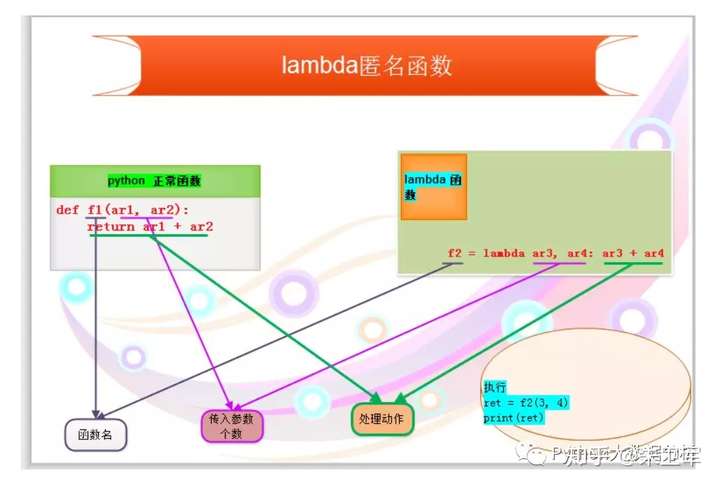
def f(x,y):
return x*y
f(1,2)
func = lambda x,y:x*y
func(1,2)匿名函数的优点:
不用取名称,因为给函数取名是比较头疼的一件事,特别是函数比较多的时候
可以直接在使用的地方定义,如果需要修改,直接找到修改即可,方便以后代码的维护工作
语法结构简单,不用使用 def 函数名(参数名):这种方式定义,直接使用 lambda 参数:返回值 定义即可
全为 0/1 的数组
import numpy as np
np.ones((2, 2, 3))
np.zeros((2, 2, 3))
np.empty((2, 2, 3) )Python 中,++1 就是1,而–1,则为1,负负得正, 在Python 中,++1 不是自增操作.
统计相关
最小值和最大值
import numpy as np
M = np.random.random((2, 2))
M.sum()
# => 3.096348468019526
M.min(axis = 0)
# => array([0.72297729, 0.49036662])
from sklearn.preprocessing import MinMaxScaler
#区间缩放,返回值为缩放到[0, 1]区间的数据
minMaxScaler = MinMaxScaler().fit(X_train)
# => Traceback (most recent call last):
# File "<stdin>", line 1, in <module>
# File "/path/to/example", line 1, in <module>
# # -*- org-confirm-babel-evaluate: nil; -*-
# NameError: name 'X_train' is not defined
minMaxScaler.transform(X_train)
# => Traceback (most recent call last):
# File "<stdin>", line 1, in <module>
# NameError: name 'minMaxScaler' is not defined数组值求和
import numpy as np
L = np.random.random(100)
sum(L)
# => 46.01864793657274
np.prod(x)
# => 7
np.cumsum(x)
# => array([7])当数组数据中有缺失值 None 时,就需要借助filter 函数,这点没有R 来的方便。
sum(filter(None, [1,2,3,None]))
# => 6
sum(filter(lambda x :x == 1.0, [1.0, 1.0, 3.0]))
# => 2.0
seq = [0, 1, 2, 3, 5, 8]
filter(lambda x:x % 2 != 0, seq)
# => [1, 3, 5]
filter(None, [1,2,3,None]) #很奇怪
# => [1, 2, 3]array 变成矩阵,可以通过限定 shape 来确定矩阵维数。
x = np.array([32, -12, 3, 5])
x.reshape((2, 2))
# =>
# array([[ 32, -12],
# [ 3, 5]])
x.shape = 2, 2
x
# =>
# array([[ 32, -12],
# [ 3, 5]])
np.diff(x, axis=0) #按行差分
# => array([[-29, 17]])
np.diff(x, axis=1) #按列差分
# =>
# array([[-44],
# [ 2]])kronecker 积
import numpy as np
A = np.eye(3)
# =>
# array([[1., 0., 0.],
# [0., 1., 0.],
# [0., 0., 1.]])
B = np.array([[1,2], [3, 4]])
np.kron(A, B)
# =>
# array([[1., 2., 0., 0., 0., 0.],
# [3., 4., 0., 0., 0., 0.],
# [0., 0., 1., 2., 0., 0.],
# [0., 0., 3., 4., 0., 0.],
# [0., 0., 0., 0., 1., 2.],
# [0., 0., 0., 0., 3., 4.]])舍入运算
在 R 里面是 round(x,6).在Python 中,也可以直接使用 round.
import numpy as np
x = np.array([1.234, 2.387, 3.673])
# => array([1.234, 2.387, 3.673])
np.round(x, 2) #四舍五入
# => array([1.23, 2.39, 3.67])
round(1344545, -1)
# => 1344540
np.around(x, 2)
# => array([1.23, 2.39, 3.67])
np.floor(x) #保留整数位
# => array([1., 2., 3.])
np.ceil(x)
# => array([2., 3., 4.])指数,对数,符号函数,绝对值,极值
import numpy as np
x = np.array([-2, 7, 9, 6]).reshape(2, 2)
x
# =>
# array([[-2, 7],
# [ 9, 6]])
np.sign(x)
# =>
# array([[-1, 1],
# [ 1, 1]])
np.exp(x)
# =>
# array([[1.35335283e-01, 1.09663316e+03],
# [8.10308393e+03, 4.03428793e+02]])
np.log(x)
# =>
# array([[ nan, 1.94591015],
# [2.19722458, 1.79175947]])
np.abs(x)
# =>
# array([[2, 7],
# [9, 6]])
x.max()
# => 9
np.argmin(x, 0)
# => array([0, 1])np.arange(3,5,.5) #从3到5(不包含5)等间隔为0.5 的数列
# => array([3. , 3.5, 4. , 4.5])
np.arange(4)
# array([0, 1, 2, 3])点乘法
x = np.arange(4,7,.4)
y = np.arange(1,5)
np.dot(x.reshape(len(x), 1),
y.reshape(1, len(y)))数组维度大小
np.shape(x)
np.shape(y)转置
import numpy as np
x = [[2,3],[7,5]]
z = np.asmatrix(x)
# =>
# matrix([[2, 3],
# [7, 5]])
print(z, type(z))
print(z.transpose()*z)
print(z.T*z)维数和大小
np.ndim(z)
# => 2
z.shape
# => (2, 2)画图
import matplotlib
import matplotlib.pyplot as plt
import numpy as np
import pandas as pd
import sklearn
def prepare_country_stats(oecd_bli, gdp_per_capita):
oecd_bli = oecd_bli[oecd_bli["INEQUALITY"]=="TOT"]
oecd_bli = oecd_bli.pivot(index="Country", columns="Indicator", values="Value")
gdp_per_capita.rename(columns={"2015": "GDP per capita"}, inplace=True)
gdp_per_capita.set_index("Country", inplace=True)
full_country_stats = pd.merge(left=oecd_bli, right=gdp_per_capita,
left_index=True, right_index=True)
full_country_stats.sort_values(by="GDP per capita", inplace=True)
remove_indices = [0, 1, 6, 8, 33, 34, 35]
keep_indices = list(set(range(36)) - set(remove_indices))
return full_country_stats[["GDP per capita", 'Life satisfaction']].iloc[keep_indices]
##load data
url1 = "https://raw.githubusercontent.com/WillKoehrsen/Hands-On-Machine-Learning/master/handson-ml-master/datasets/lifesat/oecd_bli_2015.csv"
oecd_bli = pd.read_csv(url1, thousands=',')
url2 = 'https://raw.githubusercontent.com/ageron/handson-ml/master/datasets/lifesat/gdp_per_capita.csv'
gdp_per_capita = pd.read_csv(url2, thousands=',', delimiter='\t', encoding='latin1',na_values="n/a")
#prepare the data
country_stats = prepare_country_stats(oecd_bli, gdp_per_capita)
x = np.c_[country_stats['GDP per capita']]
y = np.c_[country_stats['Life satisfaction']]
##visualize the data
country_stats.plot(kind='scatter', x="GDP per capita", y='Life satisfaction')
plt.show()如何解决标题有中文的问题?
import matplotlib.pyplot as plt
from matplotlib.font_manager import FontProperties
# 设置中文字体
font = FontProperties(fname='/System/Library/Fonts/STHeiti Light.ttc', size=12)
plt.rcParams['font.family'] = 'Arial Unicode MS'
# Data preparation for the bar charts
categories = ['个级', '十级', '百级', '千级', '万级', '十万+']
types = ['DB', 'RZ', 'ZJ', 'TG', 'DL', 'ZF']
# 2023 data
data_2023 = {
'DB': [7, 6, 10, 1, 0, 0],
'RZ': [21, 33, 13, 6, 4, 0],
'ZJ': [5, 4, 2, 5, 3, 1],
'TG': [0, 5, 1, 3, 0, 0],
'DL': [5, 16, 6, 4, 0, 0],
'ZF': [3, 4, 7, 3, 1, 0]
}
# 2022 data
data_2022 = {
'DB': [6, 5, 9, 2, 0, 0],
'RZ': [28, 28, 14, 6, 2, 0],
'ZJ': [3, 2, 2, 5, 2, 1],
'TG': [3, 1, 1, 3, 0, 0],
'DL': [5, 9, 6, 2, 0, 0],
'ZF': [4, 4, 2, 3, 1, 0]
}
# Function to plot the data
def plot_data(year, data):
plt.figure(figsize=(14, 8))
bar_width = 0.1
x = list(range(len(categories)))
for i, (category, values) in enumerate(data.items()):
plt.bar([x + bar_width * i for x in range(len(categories))], values, width=bar_width, label=f'{category} ({year})')
plt.xlabel('类别', fontproperties=font)
plt.ylabel('数量', fontproperties=font)
plt.xticks([r + bar_width * (len(types) - 1) / 2 for r in range(len(categories))], categories, fontproperties=font)
plt.legend(prop=font)
plt.title(f'各类别数量统计 ({year})', fontproperties=font)
plt.tight_layout()
plt.show()
# Plotting the data for 2023 and 2022
plot_data('2023年', data_2023)
plot_data('2022年', data_2022)线性模型
##load data
url1 = "https://raw.githubusercontent.com/WillKoehrsen/Hands-On-Machine-Learning/master/handson-ml-master/datasets/lifesat/oecd_bli_2015.csv"
oecd_bli = pd.read_csv(url1, thousands=',')
url2 = 'https://raw.githubusercontent.com/ageron/handson-ml/master/datasets/lifesat/gdp_per_capita.csv'
gdp_per_capita = pd.read_csv(url2, thousands=',', delimiter='\t', encoding='latin1',na_values="n/a")
#prepare the data
country_stats = prepare_country_stats(oecd_bli, gdp_per_capita)
x = np.c_[country_stats['GDP per capita']]
y = np.c_[country_stats['Life satisfaction']]
##visualize the data
country_stats.plot(kind='scatter', x="GDP per capita", y='Life satisfaction')
plt.show()
#select a linear model
lin_reg_model = sklearn.linear_model.LinearRegression()
#train the model
lin_reg_model.fit(x,y)
#Make a prediction for cyprus
x_new = [[22587]]
print(lin_reg_model.predict(x_new))np.random.seed(1010)
X = np.random.randn(100, 3)
X1 = np.hstack((np.ones((100, 1)),X))
y = np.random.randn(100)
beta,SSR,rank,sv = np.linalg.lstsq(X, y)
betalasso
from sklearn import linear_model
clf = linear_model.Lasso(alpha=0.1)
clf.fit([[0, 0],
[1, 1],
[2, 2]],
[0, 1, 2])
clf.coef_
clf.intercept_常用包
numpy
shape
数据维度.
import numpy as np np.shape(np.eye(3)) # => (3, 3)type
数据类型转变
import numpy as np arr=np.array([1,2,3,4,5]) arr.dtype # => dtype('int64') float_arr=arr.astype(np.float64) # => float_arr.dtype # => dtype('float64')eye
单位矩阵.
np.eye(3) # => # array([[1., 0., 0.], # [0., 1., 0.], # [0., 0., 1.]])reshape
Gives a new shape to an array without changing its data.
a = np.arange(6).reshape((3, 2)) # => # array([[0, 1], # [2, 3], # [4, 5]]) np.reshape(a, (2, 3)) # => # array([[0, 1, 2], # [3, 4, 5]]) a = np.zeros((10, 2))a # => # array([[0, 1], # [2, 3], # [4, 5]]) np.reshape(a, 6, order='F') # => array([0, 2, 4, 1, 3, 5]) np.reshape(a, 6) # => array([0, 1, 2, 3, 4, 5])在Python的NumPy库和很多其他相关的机器学习库中,
y.reshape(-1,1)是一种常见的数组重新塑形(reshaping)操作。reshape是一个常用的函数,它可以改变数组的形状。在这个例子中,y是一个数组,我们想把它改变成一个二维数组,其中,第二个维度的大小是1。而
-1在reshape函数中有特殊的意义。当我们在一个维度上使用-1时,那个维度的大小就会被自动计算。具体来说,-1表示的维度的大小会根据数组的总大小和其他维度的大小来计算。例如,如果我们有一个大小为12的一维数组,我们可以把它重新塑形为(3,4),(4,3),(2,6),(6,2),(1,12)等等。如果我们用-1替换任何一个维度,比如(3,-1),NumPy会自动计算-1处应该是4,因为3*4=12正好是数组的总大小。所以,
y.reshape(-1,1)表示的是把y改变成一个二维数组,其中,第二个维度的大小是1,第一个维度的大小是自动计算的,以确保整个数组的大小不变。这通常用于将一维数组转换为二维的列向量,方便在某些需要二维输入的机器学习算法中使用。ravel
Return a contiguous flattened array. 有点像是拍平!np.ravel 等价于 np.reshape(-1,order='T').
x = np.array([[1, 2, 3], [4, 5, 6]]) np.ravel(x) # => array([1, 2, 3, 4, 5, 6]) x # => # array([[1, 2, 3], # [4, 5, 6]]) np.ravel(x, order='F') # => array([1, 4, 2, 5, 3, 6])flatten
拍平操作.
import itertools list2d = [[1, 2, 3], [4, 5, 6]] merged = list(itertools.chain(*list2d)) import numpy as np a= np.array([[1, 2], [3, 4]]).flatten() # => array([1, 2, 3, 4]) b = np.array(a).flatten().tolist() # => [1, 2, 3, 4]itertools.chain(*list2d)这个函数的用法是将多个列表(或者其他可迭代对象)连接在一起,形成一个新的迭代器。在这个例子中,list2d是一个二维列表,*list2d将其解包成两个独立的列表[1, 2, 3]和[4, 5, 6]。然后,itertools.chain(*list2d)将这两个列表连接在一起,形成一个一维的迭代器。这个迭代器可以迭代所有的元素,就像它们是在一个列表中一样。但是这并不会真的创建一个新的列表(除非你像在这个例子中那样,使用
list()显式地将其转换为列表)。这意味着这个函数在处理大数据集的时候非常有用,因为它不会占用额外的内存。所以,这段代码:
import itertools list2d = [[1, 2, 3], [4, 5, 6]] merged = list(itertools.chain(*list2d))最终的结果是
merged变量会变成一个列表[1, 2, 3, 4, 5, 6],这个列表包含了list2d中所有的元素。flat
A 1-D iterator over the array.方便矩阵位置赋值.loc,iloc 其实这2个命令也可以实现这个操作.但是,array 对象loc 无法进行操作,可以用flat 来实现.
x = np.arange(1, 7).reshape(2, 3) # => # array([[1, 2, 3], # [4, 5, 6]]) x.flat[3] # => 4 x.flat = 3 x # => # array([[3, 3, 3], # [3, 3, 3]])在这段代码中:
x = np.arange(1, 7).reshape(2, 3)这行代码首先使用np.arange(1, 7)生成一个包含从 1 到 6 的整数序列,然后使用reshape(2, 3)将这个序列重新整形为一个 2 行 3 列的二维数组x,如下所示:array([[1, 2, 3], [4, 5, 6]])x.flat是一个扁平迭代器,它可以让我们以一种类似于遍历一维数组的方式遍历二维数组x中的元素。x.flat[3]表示获取这个扁平迭代器中的第 4 个元素(索引从 0 开始)。在这个例子中,x展开成一维后的序列是[1, 2, 3, 4, 5, 6],所以第 4 个元素就是4。例如,如果我们再执行
print(x.flat[5]),就会得到6。在这里,
numpy.arange(1, 7).reshape(2, 3)创建了一个 2x3 的 NumPy 数组,如下:[[1 2 3] [4 5 6]]然后,
x.flat是一个迭代器,它可以用于遍历数组x中的所有元素,按行优先的顺序。也就是说,它将多维数组 "平坦化" 为一维数组。所以,x.flat对应的一维数组是[1, 2, 3, 4, 5, 6]。x.flat[3]则是获取这个 "平坦化" 后的数组中的第四个元素(Python 的索引从 0 开始)。因此,结果是4。copy
可以对数据对象进行复制。
import numpy as np x = np.array([1, 2, 3]) y = x z = np.copy(x) x[0] = 100 # => 100 x[0] == y[0] x[0] == z[0]在你的代码中,你创建了一个名为
x的 NumPy 数组,并将其值设置为[1, 2, 3]。然后,你创建了两个x的副本,y和z,但是它们是通过不同的方式创建的。当你使用
y = x语句时,你创建了x的一个引用,而不是一个完全独立的副本。这意味着y和x实际上指向的是内存中的同一位置,所以当你改变x中的任何值时,y中的相应值也会改变。这点与 R 不一致。
然而,当你使用
z = np.copy(x)语句时,你创建了x的一个真正的副本。这意味着z在内存中有自己的位置,与x完全无关。因此,即使你改变x中的值,z中的值也不会受到影响。因此,当你执行
x[0] = 100语句后,x[0]和y[0]都变成了100,但z[0]仍然是1。所以,x[0] == y[0]返回True,而x[0] == z[0]返回False。这就是为什么在处理数组和其他数据结构时,需要明确区分引用和副本。在某些情况下,你可能只需要创建一个引用,以节省内存和计算资源。在其他情况下,你可能需要创建一个真正的副本,以避免原始数据被意外修改。
在嵌套数据中,需要借助 copy 包的 deepcopy 函数进行处理。
list = [[1, 2, 3, 4, 5, 6]] new_copy = copy.copy(list) list.append([1, 2, 3]) list # => [[1, 2, 3, 4, 5, 6], [1, 2, 3]] list[0][1] = 3 list # => [[1, 3, 3, 4, 5, 6], [1, 2, 3]] new_copy # 没有变化 # => [[1, 3, 3, 4, 5, 6]] list = [[1, 2, 3, 4, 5, 6]] new_copy = copy.deepcopy(list) list[0][1] = 3 list # => [[1, 3, 3, 4, 5, 6]] new_copy # => [[1, 2, 3, 4, 5, 6]]moveaxis
Move axes of an array to new positions.
首先,我们创建了一个形状为 (3, 4) 的全零数组
x。它可以想象为有 3 行和 4 列的二维数组。[[0, 0, 0, 0], [0, 0, 0, 0], [0, 0, 0, 0]]然后,我们使用
np.moveaxis(x, 0, -1)函数来移动轴。这个函数的作用是更改数组的轴的顺序。在这个函数中,
0是源位置,-1是目标位置。源和目标位置都是基于零的索引。-1在 NumPy 中表示最后一个轴,所以这个函数的作用是将第一个轴(即行)移动到最后一个轴的位置。- 在二维数组中,移动第一个轴到最后一个轴的位置实际上就是将行和列交换(也就是转置)。
所以,
np.moveaxis(x, 0, -1).shape的结果是(4, 3),这是因为原始的(3, 4)数组被转置为(4, 3)数组。换句话说,原本有 3 行 4 列的数组变成了 4 行 3 列的数组。import numpy as np x = np.zeros((3, 4)) x.shape # => (3, 4) np.moveaxis(x, 0, -1).shape # => (4, 3)进一步解释:在 NumPy 中,数组轴的编号从 0 开始。对于二维数组,0轴通常表示行,1轴表示列。
np.moveaxis函数的用法是np.moveaxis(array, source, destination),其中source是要移动的轴的当前位置,而destination是你想要移动到的位置。在我们的例子中,source为 0,而destination为 -1。在 Python(和很多其他编程语言)中,-1 通常用来表示列表或数组的最后一个元素。所以,当我们说
np.moveaxis(x, 0, -1),我们的意思是:“将 0 轴(行)移动到最后一个位置”。这就是为什么我们说 "你告诉 NumPy 你想把 0 轴(行)移动到最后" 的原因。希望这能帮助你理解。
np.moveaxis 用于调整数组的维度(轴)。 在 numpy 中,多维数组的每个维度都可以被看作一个轴。np.moveaxis 函数允许您指定要移动的轴以及它要移动到的目标位置,从而改变数组的维度顺序。 例如,对于一个三维数组,您可以使用 np.moveaxis 来重新排列三个维度的顺序。
rollaxis
Roll the specified axis backwards, until it lies in a given position.
a = np.ones((1, 2, 3)) a.shape # => (1, 2, 3) np.rollaxis(a, 2, 0).shape # => (3, 1, 2)首先,
np.ones((1, 2, 3))创建了一个形状为 (1, 2, 3) 的数组a,这是一个三维数组,第一个维度(轴0)长度为1,第二个维度(轴1)长度为2,第三个维度(轴2)长度为3。然后,
np.rollaxis(a, 2, 0)的作用是将a的第三个维度(轴2)滚动到第一个位置(轴0),并将原来的第一、第二维度依次向后滚动。这里是如何工作的:
np.rollaxis(a, 2, 0)指的是把原数组a的轴2(长度为3)滚动到轴0的位置。- 原来的轴0(长度为1)滚动到轴1的位置。
- 原来的轴1(长度为2)滚动到轴2的位置。
所以结果的形状为
(3, 1, 2)。总的来说,
np.rollaxis函数的作用就是将指定的轴滚动到指定的位置,其他轴的相对位置保持不变。swapaxes
Interchange two axes of an array.交换轴.
x = np.array([[1, 2, 3]]) x.shape # => (1, 3) np.swapaxes(x, 0, 1).shape # => (3, 1) import numpy as np # 解释以下代码: # 创建一个包含[1, 2, 3]的NumPy数组 x = np.array([1, 2, 3]) # 将x重塑为3行1列的二维数组 x = x.reshape(-1, 1) # 交换x的轴0和轴1,并获取新数组的形状 # 这将把3x1的数组变成1x3的数组 np.swapaxes(x, 0, 1).shapendarray.T
The transposed array.转置
x = np.array([[1, 2], [3, 4]]) x # => # array([[1, 2], # [3, 4]]) x.T # => # array([[1, 3], # [2, 4]])transpose
Reverse or permute the axes of an array; returns the modified array.
x = np.ones((1, 2, 3)) x.shape # => (1, 2, 3) np.transpose(x, (1, 0, 2)).shape # => (2, 1, 3)broadcast
Produce an object that mimics broadcasting.
x = np.array([[1], [2]]) y = np.array([4, 5, 6]) b = np.broadcast(x, y) out = np.empty(b.shape) out.flat = [u + v for (u, v) in b] out x + y # => # array([[5, 6, 7], # [6, 7, 8]])broadcastto
Broadcast an array to a new shape.
x = np.array([1, 2, 3]) np.broadcast_to(x, (3, 3)) # => # array([[1, 2, 3], # [1, 2, 3], # [1, 2, 3]])broadcastarrays
broadcast any number of arrays against each other.
x = np.array([[1, 2, 3]]) y = np.array([[4], [5]]) np.broadcast_arrays(x, y) # => # [array([[1, 2, 3], # [1, 2, 3]]), array([[4, 4, 4], # [5, 5, 5]])]expanddims
拓宽数据的维度.
x = np.array([1, 2, 3]) x.shape # => (3,) x # => array([1, 2, 3]) y = np.expand_dims(x, axis=0) y.shape # => (1, 3) y # => array([[1, 2, 3]]) y = np.expand_dims(x, axis=1) # => # array([[1], # [2], # [3]]) y.shape # => (3, 1)tile
很像是 R 中的rep 函数,就是复制。
import numpy as np a = np.array([0, 1, 2]) np.tile(a, 2) # => array([0, 1, 2, 0, 1, 2]) b = np.array([[1, 2], [3, 4]]) np.tile(b, 2) # => # array([[1, 2, 1, 2], # [3, 4, 3, 4]])insert
在特定位置插入值.这段文本是关于 Python 编程语言中的操作。首先,
a=np.array([[1,1],[2,2],[3,3]])这部分创建了一个名为a的 NumPy 数组。然后,np.insert(a,1,5)这一操作是使用 NumPy 库的insert函数对数组a进行插入操作,在索引为 1 的位置插入值 5 。a = np.array([[1, 1], [2, 2], [3, 3]]) np.insert(a, 1, 5) # => array([1, 5, 1, 2, 2, 3, 3])block
Assemble an nd-array from nested lists of blocks.把所有的数据放在一起.
a = np.eye(2)*2 b = np.eye(3)*3 np.block([ [a, np.zeros((2, 3))], [np.ones((3, 2)), b], ]) # => # array([[2., 0., 0., 0., 0.], # [0., 2., 0., 0., 0.], # [1., 1., 3., 0., 0.], # [1., 1., 0., 3., 0.], # [1., 1., 0., 0., 3.]])trimzeros
剔除前面或后面的0向量.Trim the leading and/or trailing zeros from a 1-D array or sequence.
import numpy as np a = np.array((0, 0, 0, 1, 2, 3)) np.trim_zeros(a) # => array([1, 2, 3])arange
有点像R 中的seq(1,15).
import numpy as np a = np.arange(15).reshape(3, 5) # => # array([[ 0, 1, 2, 3, 4], # [ 5, 6, 7, 8, 9], # [10, 11, 12, 13, 14]]) a.shape # => (3, 5) a.ndim # => 2 a.itemsize # => 8 a.size # => 15 type(a) # => <class 'numpy.ndarray'> a.dtype.name # => 'int64'ndim
数据的维度.
import numpy as np a = np.arange(15).reshape(3, 5) # => # array([[ 0, 1, 2, 3, 4], # [ 5, 6, 7, 8, 9], # [10, 11, 12, 13, 14]]) a.ndim # => 2linspace
linspace()将创建具有指定数量元素的数组,并在指定的开始值和结束值之间平 均间隔.
np.linspace(1, 4, 6) # => array([1. , 1.6, 2.2, 2.8, 3.4, 4. ])indices
indices()将创建一组数组(堆积为一个更高维的数组),每个维度一个,每个维度 表示该维度中的变化.
l = np.indices((3, 3)) # => # array([[[0, 0, 0], # [1, 1, 1], # [2, 2, 2]], # # [[0, 1, 2], # [0, 1, 2], # [0, 1, 2]]]) l.shape # => (2, 3, 3)reduce
reduce,类似于 R 中的函数。如果需要存储每次计算的中间结果,那么可以使用 accumulate, sum, np.prod, np.cumsum, np.cumprod 这些函数都可以实现 reduce 的功能。
import numpy as np x = np.arange(1, 6) x # => array([1, 2, 3, 4, 5]) np.add.reduce(x) # => 15 np.multiply.reduce(x) # => 120 np.multiply.accumulate(x) # => array([ 1, 2, 6, 24, 120])functools 包中也有 reduce 函数。
meshgrid
可以生成 grid 型数据。
points = np.arange(-1, 1, 0.5) xs, ys= np.meshgrid(points, points) xs # => # array([[-1. , -0.5, 0. , 0.5], # [-1. , -0.5, 0. , 0.5], # [-1. , -0.5, 0. , 0.5], # [-1. , -0.5, 0. , 0.5]])countnonzero
如果需要统计布尔数组中 True 记录的个数,可以使用 np.countnonzero 函数。
X = np.random.random((2, 3)) X.mean(0) #对列进行统计 # => array([0.50275777, 0.77663369, 0.52202549]) X.mean(1) #对行进行统计 # => array([0.57452292, 0.62642171]) X < 0.2 #对所有元素进行判断 # => # array([[False, False, False], # [False, False, False]]) np.count_nonzero(X<0.2) #统计True 的个数 # => 0广播
对于同样大小的数组,二进制操作是对相应元素逐个计算:
import numpy as np a = np.array([0, 1, 2]) b = np.array([5, 5, 5]) a + b # => array([5, 6, 7]) a = np.array([0, 1, 2]) a + 5 # => array([5, 6, 7])outer
外积.
import numpy as np x = np.array([0, 1, 2]) np.multiply.outer(x, x) # => # array([[0, 0, 0], # [0, 1, 2], # [0, 2, 4]])vstack/hstack
numpy 中可以用 np.vstack, np.hstack.函数将 numpy 数组进行合并。
a = np.array([1, 2, 3]) b = np.array([4, 5, 6]) np.vstack((a, b)) np.hstack((a,b))习惯 R 语法后,一直没明白为什么 python 的语言里面np.vstack((a, b)),而不是np.vstack(a, b)
Note
在 Python 的
numpy中,np.vstack((a, b))这样的写法是因为函数参数的设计和语法规则。这种将参数放在元组中的方式可以更清晰地区分单个参数和多个参数的情况,避免了参数传递的歧义。
例如,如果直接写成
np.vstack(a, b),可能会导致解释器难以确定这两个参数是要分别处理还是作为一个整体来处理。使用元组
(a, b)明确地表示这是一组要进行垂直拼接的数组,提高了代码的可读性和可理解性,也符合 Python 中函数调用时传递参数的一般规范。再比如,有些函数可能需要接受可变数量的参数,使用元组或列表来包裹这些参数能更有效地组织和传递数据。
concatenate
numpy 中可以用 np.concatenate 函数将 numpy 数组进行合并。np.vstack np.hstack.
x = [1, 2, 3] y = [4, 5, 6] np.concatenate([x,y]) # array([1, 2, 3, 4, 5, 6]) x = np.array([[1,2],[3,4]]) y = np.array([[5,6],[7,8]]) np.concatenate((x, y), axis = 0) #x,y 纵向叠加合并成4乘2矩阵 # => # array([[1, 2], # [3, 4], # [5, 6], # [7, 8]]) np.concatenate((x, y), axis = 1) #x,y 纵向叠加合并成2乘4矩阵 # => # array([[1, 2, 5, 6], # [3, 4, 7, 8]]) np.vstack((x, y)) #np.concatenate((x, y), axis = 0) # => # array([[1, 2], # [3, 4], # [5, 6], # [7, 8]]) np.hstack((x, y)) #np.concatenate((x, y), axis = 1) # => # array([[1, 2, 5, 6], # [3, 4, 7, 8]])d = [] for x in range(6): if x % 2 ==0: d.append(x)sort
可以对数组进行排序。
arr=np.array([1,2,3]) np.sort(arr)random.rand
如果需要使用 numpy 生成一个 2 行 2 列,元素值随机在 0 到 1 之间的数组,那么就需要使用这个命令。
random_array = np.random.rand(2, 2)random.randn
返回一个具有指定形状的数组,其中的元素服从标准正态分布(均值为 0,标准差为 1)。
normal_array = np.random.randn(2, 3)例如,生成的数组可能类似于 [[ 0.54, -1.2, 0.78], [-0.21, 1.32, -0.55]]
random.randint
np.random.randint(low, high=None, size=None, dtype=int):返回一个在指定范围内的随机整数数组。如果只指定 low,则返回从 0 到 low - 1 的随机整数。 如果指定了 high,则返回从 low 到 high - 1 的随机整数。
int_array = np.random.randint(10, size=(2, 2))例如,生成的数组可能是 [[2, 7], [5, 1]]
random.randomsample
np.random.randomsample(size=None):返回一个在 0 到 1 之间的随机浮点数数组。这与 np.random.rand 类似,但参数形式不同。
sample_array = np.random.random_sample((2, 2))例如,可能生成 [[0.32, 0.87], [0.11, 0.55]]
pandas
series
用值列表生成series时,学习任何知识都是勤练习,多思考,学习R也例外!
import pandas as pd import numpy as np df2 = pd.DataFrame({'A':1, 'B':pd.Timestamp('20130102'), 'C':pd.Series(1, index=list(range(4)), dtype='float32'), 'D':np.array([3]*4, dtype='int32'), 'E':pd.Categorical(["test",'train','test','train']), 'F':'foo'}) df2 # => A B C D E F # 0 1 2013-01-02 1.0 3 test foo # 1 1 2013-01-02 1.0 3 train foo # 2 1 2013-01-02 1.0 3 test foo # 3 1 2013-01-02 1.0 3 train foo df2.dtypes # => A int64 # B datetime64[ns] # C float32 # D int32 # E category # F object # dtype: objectCategorical
import pandas pd.Categorical(["a", "b", "c", "a", "b", "c"])type
返回的是数据的类型,是 pandas 还是 numpy。
import seaborn as sns flights = sns.load_dataset('flights') type(flights) ##pandas.core.frame.DataFramevaluecounts
valuecounts() 相当于 dplyr 包中的 count(). 相当于 R 中的 table.具体用法是 df.colName.valuecounts().
import numpy as np import pandas as pd X = np.random.randint(0, 5, size=10) X_series = pd.Series(X) print(X_series.value_counts()) housing['income_cat'].value_counts() count.nlargest(2).indexindex
列出行名.
df2.index # => Int64Index([0, 1, 2, 3], dtype='int64')array
To get the actual data inside a Index or Series, use the .array property.
在这段代码中,
longseries是一个Pandas Series对象,通过使用pd.Series函数创建。np.random.randn(1000)生成了一个包含1000个随机数的NumPy数组,这些随机数是从标准正态分布中采样得到的。longseries.array是Series对象的一个属性,它返回Series中的数据作为一个PandasArray对象。PandasArray类似于NumPy数组,但具有更多的功能和特性,例如能够处理缺失值、支持不同的数据类型等。通过访问
longseries.array,你可以对Series中的数据执行各种操作,如统计描述、筛选、转换等。例如,你可以使用longseries.array.mean()计算Series数据的平均值,总而言之,
longseries.array提供了访问和操作Series数据的接口,使你能够利用Pandas和NumPy提供的丰富功能来处理数据。import pandas as pd import numpy as np long_series = pd.Series(np.random.randn(1000)) long_series.array # => <PandasArray> # [ 0.7009837679144912, 0.16885538758159144, 2.573865245578656, # 1.4283473118852112, 1.974070463115751, 0.4341539599741838, # 0.505600820019201, 0.3360589041563603, 1.4460030901298386, # 0.3589825645066268, # ... # -1.1678746399942688, -0.0855414885844917, 1.1333732274181514, # -0.8769880185307921, -0.6450061933730409, -0.033590438194597456, # 1.8282056092694392, 0.7239195144967069, -0.01121055318663693, # -0.036686559842060255] # Length: 1000, dtype: float64If you know you need a NumPy array, use tonumpy() or numpy.asarray().
long_series.to_numpy()column
展示列名.
df2.columns # => Index(['A', 'B', 'C', 'D', 'E', 'F'], dtype='object')tonumpy
输出底层数据的 NumPy 对象。注意,DataFrame 的列可能由多种数据类型组成,这类转换可能比较耗费资源;这也是 pandas 和 NumPy 的本质区别之一:NumPy 数组通常只有一种数据类型,而 DataFrame 的每列可以有不同的数据类型。
调用 DataFrame.tonumpy() 时,pandas 会查找能够兼容 DataFrame 中所有数据类型的 NumPy 数据类型。也可以使用 object 类型,把 DataFrame 列里的值强制转换为 Python 对象。
df2 = pd.DataFrame({'A':1, 'B':pd.Timestamp('20130102'), 'C':pd.Series(1, index=list(range(4)), dtype='float32'), 'D':np.array([3]*4, dtype='int32'), 'E':pd.Categorical(["test",'train','test','train']), 'F':'foo'}) df2.to_numpy() # => # array([[1, Timestamp('2013-01-02 00:00:00'), 1.0, 3, 'test', 'foo'], # [1, Timestamp('2013-01-02 00:00:00'), 1.0, 3, 'train', 'foo'], # [1, Timestamp('2013-01-02 00:00:00'), 1.0, 3, 'test', 'foo'], # [1, Timestamp('2013-01-02 00:00:00'), 1.0, 3, 'train', 'foo']], # dtype=object)df2 这个 DataFrame 包含多种类型,因此 DataFrame.tonumpy() 操作会耗费较多资源。
describe
describe 可以快速查看数据的统计摘要.
df2.describe() # => A C D # count 4.0 4.0 4.0 # mean 1.0 1.0 3.0 # std 0.0 0.0 0.0 # min 1.0 1.0 3.0 # 25% 1.0 1.0 3.0 # 50% 1.0 1.0 3.0 # 75% 1.0 1.0 3.0 # max 1.0 1.0 3.0T
转置数据.
df2.T # => 0 1 2 3 # A 1 1 1 1 # B 2013-01-02 00:00:00 2013-01-02 00:00:00 2013-01-02 00:00:00 2013-01-02 00:00:00 # C 1.0 1.0 1.0 1.0 # D 3 3 3 3 # E test train test train # F foo foo foo fooquery
这个函数可以实现filter 的功能.
import seaborn as sns import pandas as pd flight_data = sns.load_dataset('flights') (flight_data. # => year month passengers # 0 1949 Jan 112 # 1 1949 Feb 118 # 2 1949 Mar 132 # 3 1949 Apr 129 # 4 1949 May 121 # 5 1949 Jun 135 # 6 1949 Jul 148 # 7 1949 Aug 148 # 8 1949 Sep 136 # 9 1949 Oct 119 # 10 1949 Nov 104 # 11 1949 Dec 118 query('year == 1949'))transform
问题定义:
针对 ‘工作年限’,假设它与 ‘城市等级’ 相关。如何按‘城市等级’分组,并用各城市等级组内的‘工作年限’平均值填充缺失值?(注意:‘城市等级’ 本身也可使用 groupby 与 transform 填充缺失值概述。
通过按「城市等级」分组,并在各组内以「工作年限」平均值替换缺失项,实现分组填充。
代码示例
import numpy as np df['工作年限'] = df.groupby("城市等级")['工作年限'].transform(lambda x: x.fillna(np.mean(x)))工作流程
- 对 DataFrame 按「城市等级」列分组。
- 计算每个分组中「工作年限」的均值。
- 用组内均值替换该组中的缺失值。
- 将填充结果按原索引对齐回原列。
关键函数
groupby:对 DataFrame 按字段分组。transform:对每个分组执行函数并保持索引。fillna:用指定值填充缺失。
注意事项
若部分行的「城市等级」也是 NaN,则该组可能无法计算均值,需要预先处理或指定全局默认值。
empty
通过empty 属性,可以验证pandas 对象是否为空。
df.empty import pandas as pd pd.DataFrame(columns=list('ABC')).empty # => Truesortindex
排序,按行或者列都可以排序.
df2.sort_index(axis=1, ascending=False) # => F E D C B A # 0 foo test 3 1.0 2013-01-02 1 # 1 foo train 3 1.0 2013-01-02 1 # 2 foo test 3 1.0 2013-01-02 1 # 3 foo train 3 1.0 2013-01-02 1sortvalues
df2.sort_values(by = 'E') # => A B C D E F # 0 1 2013-01-02 1.0 3 test foo # 1 1 2013-01-02 1.0 3 train foo # 2 1 2013-01-02 1.0 3 test foo # 3 1 2013-01-02 1.0 3 train fooreindex
添加新的行名。从下面的代码可以看出新增行名,数值全为NA。
##reindex import pandas as pd import numpy as np date_index = pd.date_range('1/1/2010', periods=6, freq='D') df2 = pd.DataFrame({"prices": [100, 101, np.nan, 100, 89, 88]}, index=date_index) # => prices # 2010-01-01 100.0 # 2010-01-02 101.0 # 2010-01-03 NaN # 2010-01-04 100.0 # 2010-01-05 89.0 # 2010-01-06 88.0 date_index2 = pd.date_range('12/29/2009', periods=10, freq='D') # => # DatetimeIndex(['2009-12-29', '2009-12-30', '2009-12-31', '2010-01-01', # '2010-01-02', '2010-01-03', '2010-01-04', '2010-01-05', # '2010-01-06', '2010-01-07'], # dtype='datetime64[ns]', freq='D') df2.reindex(date_index2) # => prices # 2009-12-29 NaN # 2009-12-30 NaN # 2009-12-31 NaN # 2010-01-01 100.0 # 2010-01-02 101.0 # 2010-01-03 NaN # 2010-01-04 100.0 # 2010-01-05 89.0 # 2010-01-06 88.0 # 2010-01-07 NaN索引与选择
pandas 数据访问方法:.at,.iat,.loc,.iloc.
df2['A'] # => 0 1 # 1 1 # 2 1 # 3 1 # Name: A, dtype: int64用[] 切片行:
df2[0:3] # => A B C D E F # 0 1 2013-01-02 1.0 3 test foo # 1 1 2013-01-02 1.0 3 train foo # 2 1 2013-01-02 1.0 3 test foo df2['20130102']也可以按照标签选择.
df2.loc[0] # => A 1 # B 2013-01-02 00:00:00 # C 1.0 # D 3 # E test # F foo # Name: 0, dtype: objectdplyr 语法
- class
通过 df.info 方式查看数据集信息。
import pandas as pd df = pd.DataFrame({'Alphabet': ['a', 'b', 'c', 'd','e', 'f', 'g', 'h','i'], 'A': [4, 3, 5, 2, 1, 7, 7, 5, 9], 'B': [0, 4, 3, 6, 7, 10,11, 9, 13], 'C': [1, 2, 3, 1, 2, 3, 1, 2, 3]}) df.info() # => <stdin>:1: FutureWarning: null_counts is deprecated. Use show_counts instead # <class 'pandas.core.frame.DataFrame'> # RangeIndex: 9 entries, 0 to 8 # Data columns (total 4 columns): # # Column Non-Null Count Dtype # --- ------ -------------- ----- # 0 Alphabet 9 non-null object # 1 A 9 non-null int64 # 2 B 9 non-null int64 # 3 C 9 non-null int64 # dtypes: int64(3), object(1) # memory usage: 416.0+ bytes- filter
##filter df[df.A > 2] # => Alphabet A B C # 0 a 4 0 1 # 1 b 3 4 2 # 2 c 5 3 3 # 5 f 7 10 3 # 6 g 7 11 1 # 7 h 5 9 2 # 8 i 9 13 3还可以使用 query api 来实现这个功能。
import seaborn as sns import pandas as pd iris = sns.load_dataset("iris") iris.columns iris.query("sepal_width > 3.5 & petal_width < 0.3")- slice
筛选特定的行
df.loc[3:4, ] # => Alphabet A B C # 3 d 2 6 1 # 4 e 1 7 2- select
筛选特定的列
df.loc[:, 'A':'B'] # => A B # 0 4 0 # 1 3 4 # 2 5 3 # 3 2 6 # 4 1 7 # 5 7 10 # 6 7 11 # 7 5 9 # 8 9 13更多例子
df_titanic = sns.load_dataset('titanic') df_titanic.loc[df_titanic.age.isnull(), 'age'] = y_pred_agedftitanic.age.isnull() 是确定行,'age' 是确定列。
select(-A)
df.drop(labels=["A"], axis=1) # => Alphabet B C # 0 a 0 1 # 1 b 4 2 # 2 c 3 3 # 3 d 6 1 # 4 e 7 2 # 5 f 10 3 # 6 g 11 1 # 7 h 9 2 # 8 i 13 3- rename
如果只是对一列重命名。可以使用下面的命令。
import seaborn as sns iris=sns.load_dataset('iris') iris.rename(columns={'species':'class'}).columns可以按照一定的要求进行重命名
import pandas as pd # 创建示例数据框 data = {'length_value': [10, 20], 'width_value': [30, 40], 'other_column': ['a', 'b']} dataframe = pd.DataFrame(data) # 准备正则表达式,用于匹配包含 'length' 或 'width' 的列名 pattern = ".*(length|width)" # 使用 str.contains 方法找出符合条件的列,并统一转换为大写 dataframe.columns = [col.upper() if pd.Series(col).str.contains(pattern).any() else col for col in dataframe.columns] # 输出修改后的数据框 print(dataframe)- arrange
df.sort_values(by="A", ascending=False) # => Alphabet A B C # 8 i 9 13 3 # 5 f 7 10 3 # 6 g 7 11 1 # 2 c 5 3 3 # 7 h 5 9 2 # 0 a 4 0 1 # 1 b 3 4 2 # 3 d 2 6 1 # 4 e 1 7 2- mutate
df.assign(Aoverc=df.A/df.C, bplus=lambda df:df['B'] + 1) # => Alphabet A B C Aoverc bplus # 0 a 4 0 1 4.000000 1 # 1 b 3 4 2 1.500000 5 # 2 c 5 3 3 1.666667 4 # 3 d 2 6 1 2.000000 7 # 4 e 1 7 2 0.500000 8 # 5 f 7 10 3 2.333333 11 # 6 g 7 11 1 7.000000 12 # 7 h 5 9 2 2.500000 10 # 8 i 9 13 3 3.000000 14def is_b(letter): return letter == 'b' df.assign(is_alphabet_b=lambda df:df.Alphabet.apply(is_b)) # 使用lambda函数简化代码 df = df.assign(is_alphabet_b = df['Alphabet'].apply(lambda letter: letter == 'b')) # => Alphabet A B C is_alphabet_b # 0 a 4 0 1 False # 1 b 3 4 2 True # 2 c 5 3 3 False # 3 d 2 6 1 False # 4 e 1 7 2 False # 5 f 7 10 3 False # 6 g 7 11 1 False # 7 h 5 9 2 False # 8 i 9 13 3 False- groupby
df.groupby("C").agg({'A':['mean'], 'B':['mean']}) # => A B # mean mean # C # 1 4.333333 5.666667 # 2 3.000000 6.666667 # 3 7.000000 8.666667- distinct
iris.sepal_width.unique()- merge
df2=pd.DataFrame({'Group':['First', 'Second', 'Third'], 'C':[1, 2, 3]}) df2 # => Group C # 0 First 1 # 1 Second 2 # 2 Third 3 df.merge(df2, how="left", on="C") # => Alphabet A B C Group # 0 a 4 0 1 First # 1 b 3 4 2 Second # 2 c 5 3 3 Third # 3 d 2 6 1 First # 4 e 1 7 2 Second # 5 f 7 10 3 Third # 6 g 7 11 1 First # 7 h 5 9 2 Second # 8 i 9 13 3 Third- count
# Total number of records in dataframe len(dataframe) #150 # Number of records per Group dataframe.value_counts('Species') #分类统计 #Species #virginica 50 #versicolor 50 #setosa 50 # Note that you can also use the .groupby() method followed by size() dataframe.groupby(['Species']).size()- summary
#get mean and min for each column dataframe.agg(['mean', 'min']) # Sepal_length Sepal_width Petal_length Petal_width Species #mean 5.843333 3.057333 3.758 1.199333 NaN #min 4.300000 2.000000 1.000 0.100000 setosa # aggregation by group for all columns dataframe.groupby(['Species']).agg(['mean', 'min']) # Sepal_length Sepal_width ... # mean min mean min ... #Species #setosa 5.01 4.3 3.43 ... #versicolor 5.94 4.9 2.77 ... #virginica 6.59 4.9 2.97 ... # aggregation by group for a specific column dataframe.groupby(['Species']).agg({'Sepal_length':['mean']}) # Sepal_length # mean #Species #setosa 5.01 #versicolor 5.94 #virginica 6.59mode
可以统计 Series 或 DataFrame 的众数,即出现频率最高的值。
s5 = pd.Series([1, 1, 3, 3, 3, 5, 5, 7, 7, 7]) s5.mode() # => # 0 3 # 1 7 # dtype: int64cut
cut() 函数(以值为依据实现分箱)及 qcut() 函数(以样本分位数为依据实现分箱)用于连续值的离散化。
import numpy as np import pandas as pd arr = np.random.randn(20) pd.cut(arr,4) # => # # [(-0.444, 0.324], (0.324, 1.092], (1.092, 1.86], (-0.444, 0.324], (-1.215, -0.444], ..., (-0.444, 0.324], (1.092, 1.86], (-1.215, -0.444], (-1.215, -0.444], (1.092, 1.86]] # Length: 20 # Categories (4, interval[float64]): [(-1.215, -0.444] < # (-0.444, 0.324] < # (0.324, 1.092] < # (1.092, 1.86]] pd.qcut(arr,[0,0.25,0.5,0.75,1]) # => # # [(-0.297, 0.234], (0.234, 1.354], (1.354, 1.86], (-0.297, 0.234], (-1.2129999999999999, -0.297], ..., (-0.297, 0.234], (1.354, 1.86], (-1.2129999999999999, -0.297], (-1.2129999999999999, -0.297], (1.354, 1.86]] # Length: 20 # Categories (4, interval[float64]): [(-1.2129999999999999, -0.297] < # (-0.297, 0.234] < # (0.234, 1.354] < # (1.354, 1.86]]定义分箱时,可以传递无穷值。
pd.cut(arr,[-np.inf,0,np.inf]) # => # # [(0.0, inf], (0.0, inf], (0.0, inf], (0.0, inf], (-inf, 0.0], ..., (0.0, inf], (0.0, inf], (-inf, 0.0], (-inf, 0.0], (0.0, inf]] # Length: 20 # Categories (2, interval[float64]): [(-inf, 0.0] < (0.0, inf]]drop
删除特征。
df.drop(["pclass"], axis=1,inplace=True) df.columnsimport pandas as pd df = pd.DataFrame({'A': [1, 2, 3], 'B': [4, 5, 6]}) df_new = df.drop('B', axis=1) df_new df = pd.DataFrame({'A': [1, 2, 3], 'B': [4, 5, 6], 'C': [7, 8, 9]}) df_new = df.drop(['B','C'], axis=1)也可以删除行
# 删除单个行(基于索引) df_new = df.drop(0) df_new.head() # 删除多个行 df_new = df.drop([0,2]) df_new在 pandas 中,
fillna(…, inplace=True)的作用是直接在原对象上就地修改数据,而不是返回一个新的对象。具体来说:当
inplace=False(默认)时,fillna会返回一个填充缺失值后的新 Series 或 DataFrame,原对象保持不变,需要手动赋值,例如:newseries = series.fillna(value)。当
inplace=True时,fillna会在原 Series 或 DataFrame 上直接替换缺失值,并返回None,不需要也不应再对其结果赋值。例如:series.fillna(value, inplace=True)此时
series已被修改,填充缺失值完成。
示例演示
fillna有无inplace的区别:import pandas as pd series = pd.Series([1, None, 3, None, 5]) print("原始 series:", series.tolist()) new_series = series.fillna(0) print("new_series:", new_series.tolist()) print("原始 series 未变:", series.tolist()) series.fillna(0, inplace=True) print("inplace 后 series:", series.tolist())nlargest
本方法返回N 个最大或最小的值。
count = iris.species.value_counts() count.nlargest(2)DataFrame 也支持 nlargest 与 nsmallest 方法。
df = pd.DataFrame({'a': [-2, -1, 1, 10, 8, 11, -1], 'b': list('abdceff'), 'c': [1.0, 2.0, 4.0, 3.2, np.nan, 3.0, 4.0]}) df.nsmallest(3, 'a') #'a' 列第3小的元素concat
这个函数不能将 list 型数据进行合并。 pd.concat(objs, axis=0, join='outer').
import pandas as pd # 示例数据 x = [1, 2, 3] y = [4, 5, 6] # 使用 pd.concat 进行合并 result = pd.concat([pd.Series(x), pd.Series(y)], axis=1) print(result)用 concat() 函数可以把原 DataFrame 与新 DataFrame 组合在一起。
# 创建第一个 DataFrame df1 = pd.DataFrame({ 'A': [1, 2, 3], 'B': ['a', 'b', 'c'] }) # 创建第二个 DataFrame df2 = pd.DataFrame({ 'C': [4, 5, 6], 'D': ['d', 'e', 'f'] }) # 使用 concat 函数按列组合 result = pd.concat([df1, df2], axis='columns') print(result)append
增加记录。
import pandas as pd df = pd.DataFrame(np.random.randn(8, 4), columns=['A', 'B', 'C', 'D']) s =df.iloc[3] s # => A 1.051455 # B -0.444122 # C 0.147581 # D 0.113439 # Name: 3, dtype: float64 df.append(s, ignore_index=True) # => <stdin>:1: FutureWarning: The frame.append method is deprecated and will be removed from pandas in a future version. Use pandas.concat instead. # A B C D # 0 0.662415 1.003958 1.432511 0.547823 # 1 -0.657238 1.027014 0.059882 -0.285296 # 2 0.005379 -0.535678 0.560671 0.386939 # 3 1.051455 -0.444122 0.147581 0.113439 # 4 0.180882 0.183838 0.217537 0.344596 # 5 -0.410868 -1.575869 0.630898 0.440870 # 6 -0.960533 3.319804 1.700950 -0.691808 # 7 1.124400 -0.782766 0.334236 0.673301 # 8 1.051455 -0.444122 0.147581 0.113439func
在这段代码中,首先创建了一个包含数值
1、3、5、6的pandas系列ser。然后定义了一个函数addone用于将输入值加1,并将其添加为pd.Series的方法。接着通过
ser.addone()直接调用该方法对系列进行操作,得到每个元素加1的结果。最后通过
ser.apply('addone')也实现了同样的效果,这是使用apply方法并指定函数名来对系列中的每个元素应用该函数。这种方式可以方便地为
pandas系列添加自定义的操作方法,以满足特定的数据处理需求。例如,可以定义各种不同的计算函数来对系列进行灵活的变换。ser = pd.Series([1, 3, 5, 6]) # => 0 1 # 1 3 # 2 5 # 3 6 # dtype: int64 def add_one(s): return s + 1 pd.Series.add_one = add_one ser.add_one() ser.apply('add_one') # => 0 2 # 1 4 # 2 6 # 3 7 # dtype: int64行缺失值统计
import pandas as pd dataset= pd.DataFrame({ 'A': [1, 2, np.nan, 4, 5], 'B': [np.nan, 2, 3, np.nan, 5], 'C': [1, 2, 3, 4, np.nan] }) count=dataset[dataset.isnull().any(axis=1)].count() print(count)dropna
分别是 dropna() (剔除缺失值) 和 fillna() (填充缺失值).可以按着行或者列筛选 NA 值。
import pandas as pd import numpy as np df1 = pd.Series([1, np.nan, 2, None]) # => 0 1.0 # 1 NaN # 2 2.0 # 3 NaN # dtype: float64 df1.dropna() # => 0 1.0 # 2 2.0 # dtype: float64默认情况下,dropna() 会剔除任何包含缺失值的整行数据。
import numpy as np df = pd.DataFrame([[1, np.nan, 2], [2, 3, 5], [np.nan, 4, 6]]) df # => 0 1 2 # 0 1.0 NaN 2 # 1 2.0 3.0 5 # 2 NaN 4.0 6 df.dropna(thresh = len(df)*0.9, axis = "columns") # => 2 # 0 2 # 1 5 # 2 6 df.dropna(thresh = len(df)*0.9, axis = "index") # 0 1 2 # 1 2.0 3.0 5可以设置按不同的坐标轴剔除缺失值,比如 axis = 1 (或 axis = 'columns') 会剔除任何包含缺失值的整列数据。
只想删除列中缺失值高于10% 的缺失值,可以设置 dropna() 里的阈值。
df.dropna(axis='columns') df.dropna(axis='columns', how='all')默认设置是 how = 'any',也就是只要有缺失值就是剔除整行或整列(通过 axis 设置座标轴),还可以设置 how = 'all',这样就只会剔除全部是缺失值的行或列了。
df.dropna(axis='rows', thresh=3)isna
缺失值。可以统计缺失值。
import seaborn as sns sns.get_dataset_names() df = sns.load_dataset("titanic") df.isna().sum() df.isnull().sum()可以统计缺失值个数。
getdummies
dummy 编码。
import pandas as pd df = pd.get_dummies(df,columns=['class']) df.columnsonehotencode
import pandas as pd from sklearn.preprocessing import OneHotEncoder # 创建一个示例数据框 df = pd.DataFrame({ 'color': ['red', 'blue', 'green', 'red', 'green'], 'size': ['small', 'medium', 'large', 'large', 'medium'], 'price': [10, 15, 20, 12, 18] }) print("原始数据框:") print(df) # 对 color 和 size 列进行 onehot 编码 encoder = OneHotEncoder(handle_unknown='ignore') encoded_array = encoder.fit_transform(df[['color', 'size']]).toarray() encoded_columns = encoder.get_feature_names_out(['color', 'size']) df_encoded = pd.DataFrame(encoded_array, columns=encoded_columns) # 将编码后的列与原始数据框中的其他列合并 df_encoded = pd.concat([df[['price']], df_encoded], axis=1) print("\nOnehot 编码后的数据框:") print(df_encoded) print("\n编码后的列名:") print(df_encoded.columns)
seaborn
getdatasetnames
获取dataset 名称。
import seaborn as sns sns.get_dataset_names()loaddataset
这个包下面有很多的数据集。
import seaborn as sns flight_data = sns.load_dataset('flights')
sklearn
学习资料 https://scikit-learn.org/stable/index.html
linearmodel
from sklearn import linear_model reg = linear_model.LinearRegression() reg.fit([[0, 0], [1, 1], [2, 2]], [0, 1, 2]) reg.coef_Non-Negative least squares
保证系数大于0
import matplotlib.pyplot as plt import numpy as np from sklearn.metrics import r2_score np.random.seed(42) n_samples, n_features = 200, 50 X = np.random.randn(n_samples, n_features) true_coef = 3 * np.random.randn(n_features) # Threshold coefficients to render them non-negative true_coef[true_coef < 0] = 0 y = np.dot(X, true_coef) # Add some noise y += 5 * np.random.normal(size=(n_samples,)) from sklearn.model_selection import train_test_split X_train, X_test, y_train, y_test = train_test_split(X, y, test_size=0.5) from sklearn.linear_model import LinearRegression reg_nnls = LinearRegression(positive=True) y_pred_nnls = reg_nnls.fit(X_train, y_train).predict(X_test) r2_score_nnls = r2_score(y_test, y_pred_nnls) print("NNLS R2 score", r2_score_nnls)ridge model
from sklearn import linear_model reg = linear_model.Ridge(alpha=.5) reg.fit([[0, 0], [0, 0], [1, 1]], [0, .1, 1]) reg.coef_ reg.intercept_可以用 cv 的方法选择超参数
import numpy as np from sklearn import linear_model reg = linear_model.RidgeCV(alphas=np.logspace(-6, 6, 13)) reg.fit([[0, 0], [0, 0], [1, 1]], [0, .1, 1]) reg.alpha_lasso
from sklearn import linear_model reg = linear_model.Lasso(alpha=0.1) reg.fit([[0, 0], [1, 1]], [0, 1]) reg.predict([[1, 1]])multi-task lasso
多任务套索允许拟合多元回归问题,共同强制选定的特征在任务上相同。这个例子模拟顺序测量,每个任务是一个时间瞬间,相关特征在振幅随时间变化而相同。这多任务套索强制要求在一个时间点选择的特征为所有时间点选择。这使得特征选择由套索更稳定。
import numpy as np import matplotlib.pyplot as plt from sklearn.linear_model import Lasso, MultiTaskLasso # 生成模拟数据 np.random.seed(42) n_samples, n_features, n_tasks = 50, 20, 10 # 50天,20个特征,10家店铺 n_relevant_features = 2 # 只有2个真正重要的特征 # 创建系数矩阵:只有少数特征在所有任务中都很重要 coef = np.zeros((n_tasks, n_features)) times = np.linspace(0, 2 * np.pi, n_tasks) for k in range(n_relevant_features): coef[:, k] = 5 * np.sin((1.0 + np.random.randn(1)) * times + 3 * np.random.randn(1)) # 生成特征矩阵和目标变量,增加噪音 X = np.random.randn(n_samples, n_features) Y = np.dot(X, coef.T) + np.random.randn(n_samples, n_tasks) * 2 # 增加噪音 # 拟合模型,调整alpha参数 lasso = Lasso(alpha=0.1) multi_task_lasso = MultiTaskLasso(alpha=1) coef_lasso = np.array([lasso.fit(X, y).coef_ for y in Y.T]) coef_multi_task_lasso = multi_task_lasso.fit(X, Y).coef_ # 可视化结果 fig, (ax1, ax2, ax3) = plt.subplots(1, 3, figsize=(15, 5)) ax1.imshow(np.abs(coef.T), interpolation='nearest', cmap='viridis', aspect='auto') ax1.set_title("Ground Truth") ax1.set_xlabel("Store") ax1.set_ylabel("Feature") ax2.imshow(np.abs(coef_lasso.T), interpolation='nearest', cmap='viridis', aspect='auto') ax2.set_title("Lasso") ax2.set_xlabel("Store") ax2.set_ylabel("Feature") ax3.imshow(np.abs(coef_multi_task_lasso.T), interpolation='nearest', cmap='viridis', aspect='auto') ax3.set_title("MultiTask Lasso") ax3.set_xlabel("Store") ax3.set_ylabel("Feature") plt.tight_layout() plt.show() # 打印结果 print("真实重要特征:", np.where(np.sum(np.abs(coef), axis=0) > 0)[0]) print("Lasso选择的特征 (每家店):") for i in range(n_tasks): print(f" 店铺 {i}: {np.where(np.abs(coef_lasso[i]) > 0.1)[0]}") print("MultiTask Lasso选择的特征:", np.where(np.sum(np.abs(coef_multi_task_lasso), axis=0) > 0.1)[0]) # 计算每种方法正确识别的特征数量 true_features = set(np.where(np.sum(np.abs(coef), axis=0) > 0)[0]) lasso_correct = sum(len(set(np.where(np.abs(coef_lasso[i]) > 0.1)[0]) & true_features) for i in range(n_tasks)) / n_tasks multi_task_correct = len(set(np.where(np.sum(np.abs(coef_multi_task_lasso), axis=0) > 0.1)[0]) & true_features) print(f"\nLasso平均正确识别的特征数: {lasso_correct:.2f}") print(f"MultiTask Lasso正确识别的特征数: {multi_task_correct:.2f}")elastic-net
# Author: Alexandre Gramfort <author_at_inria_dot_fr> # License: BSD 3 clause from itertools import cycle import matplotlib.pyplot as plt from sklearn import datasets from sklearn.linear_model import enet_path, lasso_path X, y = datasets.load_diabetes(return_X_y=True) X /= X.std(axis=0) # Standardize data (easier to set the l1_ratio parameter) # Compute paths eps = 5e-3 # the smaller it is the longer is the path print("Computing regularization path using the lasso...") alphas_lasso, coefs_lasso, _ = lasso_path(X, y, eps=eps) print("Computing regularization path using the positive lasso...") alphas_positive_lasso, coefs_positive_lasso, _ = lasso_path( X, y, eps=eps, positive=True ) print("Computing regularization path using the elastic net...") alphas_enet, coefs_enet, _ = enet_path(X, y, eps=eps, l1_ratio=0.8) print("Computing regularization path using the positive elastic net...") alphas_positive_enet, coefs_positive_enet, _ = enet_path( X, y, eps=eps, l1_ratio=0.8, positive=True ) # Display results plt.figure(1) colors = cycle(["b", "r", "g", "c", "k"]) for coef_l, coef_e, c in zip(coefs_lasso, coefs_enet, colors): l1 = plt.semilogx(alphas_lasso, coef_l, c=c) l2 = plt.semilogx(alphas_enet, coef_e, linestyle="--", c=c) plt.xlabel("alpha") plt.ylabel("coefficients") plt.title("Lasso and Elastic-Net Paths") plt.legend((l1[-1], l2[-1]), ("Lasso", "Elastic-Net"), loc="lower right") plt.axis("tight") plt.figure(2) for coef_l, coef_pl, c in zip(coefs_lasso, coefs_positive_lasso, colors): l1 = plt.semilogy(alphas_lasso, coef_l, c=c) l2 = plt.semilogy(alphas_positive_lasso, coef_pl, linestyle="--", c=c) plt.xlabel("alpha") plt.ylabel("coefficients") plt.title("Lasso and positive Lasso") plt.legend((l1[-1], l2[-1]), ("Lasso", "positive Lasso"), loc="lower right") plt.axis("tight") plt.figure(3) for coef_e, coef_pe, c in zip(coefs_enet, coefs_positive_enet, colors): l1 = plt.semilogx(alphas_enet, coef_e, c=c) l2 = plt.semilogx(alphas_positive_enet, coef_pe, linestyle="--", c=c) plt.xlabel("alpha") plt.ylabel("coefficients") plt.title("Elastic-Net and positive Elastic-Net") plt.legend((l1[-1], l2[-1]), ("Elastic-Net", "positive Elastic-Net"), loc="lower right") plt.axis("tight") plt.show()正交匹配追踪
下面通过一个具体例子解释正交匹配追踪(Orthogonal Matching Pursuit, OMP)算法的实际应用和理论背景。
理论背景
正交匹配追踪(OMP)是一种用于稀疏信号重构的贪婪算法。它的目标是从部分观测信号中恢复原始信号,特别适用于压缩感知问题。OMP 算法通过迭代选择与当前残差最相关的原子(即内积最大的原子),逐步构建稀疏表示。
OMP 算法步骤
- 初始化:设定初始残差为观测信号,选中原子集合为空。
- 原子选择:在每次迭代中,选择与当前残差最相关的原子。
- 更新选中原子集合:将选中的原子加入选中原子集合。
- 求解最小二乘问题:通过最小二乘法求解稀疏表示。
- 更新残差:更新残差为当前残差减去选中原子的贡献。
- 迭代:重复上述步骤,直到达到预定的稀疏度或残差足够小。
实际数据示例
下面是一个使用 Python 实现 OMP 算法的示例,展示如何从高维数据中提取稀疏信号:
import numpy as np from sklearn.linear_model import OrthogonalMatchingPursuit np.random.seed(0) n_samples, n_features = 50, 100 X = np.random.randn(n_samples, n_features) n_nonzero_coefs = 17 idx = np.arange(n_features) np.random.shuffle(idx) coef = np.zeros(n_features) coef[idx[:n_nonzero_coefs]] = np.random.randn(n_nonzero_coefs) y = np.dot(X, coef) y += 0.01 * np.random.normal(size=n_samples) omp = OrthogonalMatchingPursuit(n_nonzero_coefs=n_nonzero_coefs) omp.fit(X, y) coef_omp = omp.coef_ print("原始系数:", coef) print("OMP 估计的系数:", coef_omp)解释
- 数据生成:生成一个随机矩阵
X和一个稀疏系数向量coef,并用它们生成目标变量y。 - 添加噪声:在目标变量
y中添加一些噪声,以模拟真实数据中的噪声。 - OMP 算法:使用
OrthogonalMatchingPursuit类进行稀疏回归,指定非零系数的数量为n_nonzero_coefs。 - 结果输出:输出原始系数和 OMP 估计的系数,以比较两者的差异。
bayesian ridge regression
贝叶斯岭回归(Bayesian Ridge Regression)是一种基于贝叶斯理论的线性回归方法。
在传统的线性回归中,我们通过最小化残差平方和来确定模型的参数。而贝叶斯岭回归则从概率的角度来处理这个问题。
它为模型的参数赋予了先验分布,通常假设参数服从正态分布。通过结合数据和先验信息,利用贝叶斯定理计算参数的后验分布。
这种方法的优点在于它能够自动进行正则化,有效地处理数据中的噪声和共线性问题。并且,通过后验分布可以得到参数的不确定性估计,而不仅仅是一个点估计值。
在实际应用中,贝叶斯岭回归常用于数据分析、预测建模等领域。
from sklearn import linear_model X = [[0,0],[0,1],[1,0],[1,1]] Y = [0,0,1,1] reg = linear_model.BayesianRidge() reg.fit(X,Y) reg.predict([[1,0]]) reg.coef_MinMaxScaler
from sklearn.preprocessing import MinMaxScaler scaler = MinMaxScaler(feature_range=(-1,1)) train_data_normalized = scaler.fit_transform(train_data.reshape(-1,1))
面向对象
类(Class): 用来描述具有相同的属性和方法的对象的集合。它定义了该集合中每个对象所共有的属性和方法。对象是类的实例。
方法: 类中定义的函数。
类变量:类变量在整个实例化的对象中是公用的。类变量定义在类中且在函数体之外。类变量通常不作为实例变量使用。
数据成员:类变量或者实例变量用于处理类及其实例对象的相关的数据。
方法重写:如果从父类继承的方法不能满足子类的需求,可以对其进行改写,这个过程叫方法的覆盖(override),也称为方法的重写。
局部变量:定义在方法中的变量,只作用于当前实例的类。
实例变量:在类的声明中,属性是用变量来表示的,这种变量就称为实例变量,实例变量就是一个用 self 修饰的变量。
继承:即一个派生类(derived class)继承基类(base class)的字段和方法。继承也允许把一个派生类的对象作为一个基类对象对待。例如,有这样一个设计:一个 Dog 类型的对象派生自 Animal 类,这是模拟"是一个(is-a)"关系(例图,Dog 是一个 Animal)。
实例化:创建一个类的实例,类的具体对象。
对象:通过类定义的数据结构实例。对象包括两个数据成员(类变量和实例变量)和方法。
类的定义:
class ClassName:
<statement-1>
.
.
.
<statement-N>
其他编程语言中常用关键字 new 实例化类,但 Python
中没有这个关键字;Python 的类实例化形式更接近函数调用。
类实例化后,可以使用其属性,实际上,创建一个类之后,可以通过类名访问其属性。
类对象:
类对象支持两种操作:属性引用和实例化。属性引用使用 obj.name
语法;类对象创建后,类命名空间中的名称都会成为有效属性名。类方法与普通函数的主要区别是:类方法必须额外声明第一个参数,按惯例命名为
self。
在 Python 中,可以使用点 . 来访问对象的属性,也可以使用以下函数的方式来访问属性:
getattr(obj, name) 访问对象的属性
hasattr(obj, name) 检查是否存在一个属性
class myclass(object):
def __init__(self):
self.foo = 100
myinst = myclass()
hasattr(myinst, 'foo')
getattr(myinst, 'foo')
hasattr(myinst, 'bar')
getattr(myinst, 'bar')
setattr(myinst, 'bar','my attr')
getattr(myinst,'bar')
delattr(myinst, 'bar')
getattr(myinst, 'bar')setattr(obj, name, value) 设置一个属性;如果属性不存在,会创建新属性;如果已经存在,会覆盖原属性值。
delattr(obj, name) 删除属性
Python 内置类属性:
_dict__:类的属性(包含一个字典,由类的数据属性组成)
_doc__:类的文档字符串
_name__:类名
_module__:类定义所在的模块
_bases__:类的所有父类构成的元素(包含了一个由所有父类组成的元组)。
class MyClass:
i = 12345
def f(self):
return 'hello world'
#实例化
x = MyClass()
##访问类的属性和方法
print('MyClass 类的属性 i 为:', x.i)
# => MyClass 类的属性 i 为: 12345
print('MyClass 类的方法 f 输出为:', x.f())
# => MyClass 类的方法 f 输出为: hello worldPython 对象销毁(垃圾回收):Python 使用引用计数跟踪并回收对象。Python 会记录每个使用中的对象有多少引用。下面是一个完整的 Python 类示例:
class Employee:
'所有员工的基类'
empCount = 0
def __init__(self, name, salary):
self.name = name
self.salary = salary
Employee.empCount += 1
def displaycount(self):
print("Total Employee %d" % Employee.empCount)
def displayEmployee(self):
print("Name:", self.name, ", Salary:", self.salary)
print("Employee.__doc__:", Employee.__doc__)
# => Employee.__doc__: 所有员工的基类
print("Employee.__name__:", Employee.__name__)
# => Employee.__name__: Employee
print("Employee.__module__:", Employee.__module__)
# => Employee.__module__: __repl__
print("Employee.__bases__:", Employee.__bases__)
# => Employee.__bases__: (<class 'object'>,)
print("Employee.__dict__:", Employee.__dict__)
# =>
# Employee.__dict__: {'__module__':
# '__repl__', '__doc__':
# '所有员工的基类', 'empCount':
# 0, '__init__': <
# function Employee.
# __init__ at
# 0x1268529d8>, 'displaycount': <
# function Employee.
# displaycount at
# 0x126852a60>, 'displayEmployee': <
# function Employee.
# displayEmployee at
# 0x126852ae8>, '__dict__': <
# attribute '__dict__'
# of 'Employee'
# objects>, '__weakref__':
# <attribute '__weakref__' of 'Employee' objects>}类定义了_init_() 方法可以有参数,参数通过_init_()传递到类的实例化操作上的。
class Complex:
def __init__(self, realpart, imagpart):
self.r = realpart
self.i = imagpart
x = Complex(3, -4.5)
print(x.r, x.i)
# => 3 -4.5self 代表类的实例,而非类
class Test:
def prt(self):
print(self)
print(self.__class__)
t = Test()
t.prt()类的方法:
#类定义
class people:
#定义基本属性
name = ''
age = 0
#定义私有属性,私有属性在类外部无法直接进行访问
__weight = 0
#定义构造方法
def __init__(self,n,a,w):
self.name = n
self.age = a
self.__weight = w
def speak(self):
print("%s 说: 我 %d 岁。" %(self.name,self.age))
# 实例化类
p = people('runoob',10,30)
# => <__repl__.people object at 0x12685d3c8>
p.speak()
# => runoob 说: 我 10 岁。继承
Python 同样支持类的继承。派生类的定义如下:
class DerivedClassName(BaseClassName1):
<statement-1>
.
.
.
<statement-N>BaseClassName(示例中的基类名)必须与派生类定义在一个作用域内。除了类,还可以用表达式,基类定义在另一个模块中时非常有用。
#类定义
class people:
#定义基本属性
name = ''
age = 0
#定义私有属性,私有属性在类外部无法直接进行访问
__weight = 0
#定义构造方法
def __init__(self,n,a,w):
self.name = n
self.age = a
self.__weight = w
def speak(self):
print("%s 说: 我 %d 岁。" %(self.name,self.age))
#单继承示例
class student(people):
grade = ''
def __init__(self,n,a,w,g):
#调用父类的构函
people.__init__(self,n,a,w)
self.grade = g
#覆写父类的方法
def speak(self):
print("%s 说: 我 %d 岁了,我在读 %d 年级"%(self.name,self.age,self.grade))
s = student('ken',10,60,3)
s.speak()
# => ken 说: 我 10 岁了,我在读 3 年级数据结构
线性表
线性表是最常用且最简单的一种数据结构,它是 n 个数据元素的有限序列。
实现线性表的方式一般有两种,一种是使用数组存储线性表的元素,即用一组连续的存储单元依次存储线性表的数据元素。另一种是使用链表存储线性表的元素,即用一组任意的存储单元存储线性表的数据元素(存储单元可以是连续的,也可以是不连续的)。
链表
链表的结构:链表像锁链一样,由一节节节点连在一起,组成一条数据链。 链表的节点的结构如下: data next data为自定义的数据,next为下一个节点的地址。 链表的结构为,head保存首位节点的地址:
哈希表
数组可以通过下标以 O(1) 时间访问元素,但删除中间元素时需要移动其他元素,时间复杂度为 O(n)。
哈希表的思路是给每个元素计算一个逻辑下标,从而快速定位元素。它通过哈希函数计算元素应放在数组中的位置;对于同一个元素,哈希函数每次计算出的下标必须一致,并且不能超过数组长度范围。
假设有一个数组 T,包含 M = 13 个元素,可以定义一个简单的哈希函数。
h(key) = key % M假设需要插入 765、431、96、142、579、226、903、388,可以先计算它们应用哈希函数后的结果。
M = 13
h(765) = 765 % M = 11
h(431) = 431 % M = 2
h(96) = 96 % M = 5
h(142) = 142 % M = 12
h(579) = 579 % M = 7
h(226) = 226 % M = 5
h(903) = 903 % M = 6
h(388) = 388 % M = 11hash 冲突
如果有2个值均是一样,那么就有了哈希冲突(collision),如果有了冲突,这么解决呢?可以用一种链接法。
链接法的思想就是如果有了冲突,可以让数组中对应的槽变成一个链式结构。
具体可看上面那个链接。
还有一种开放寻址法,基本思想就是当一个槽被占用的时候,采用一种方式来寻找下一个可用的槽。